
Microsoft 365 Mobility and Security - MS-101 Exam Practice Test
You have a Microsoft 365 E5 subscription that uses Microsoft Defender for Office 365.
The subscription has the default inbound anti-spam policy and a custom Safe Attachments policy.
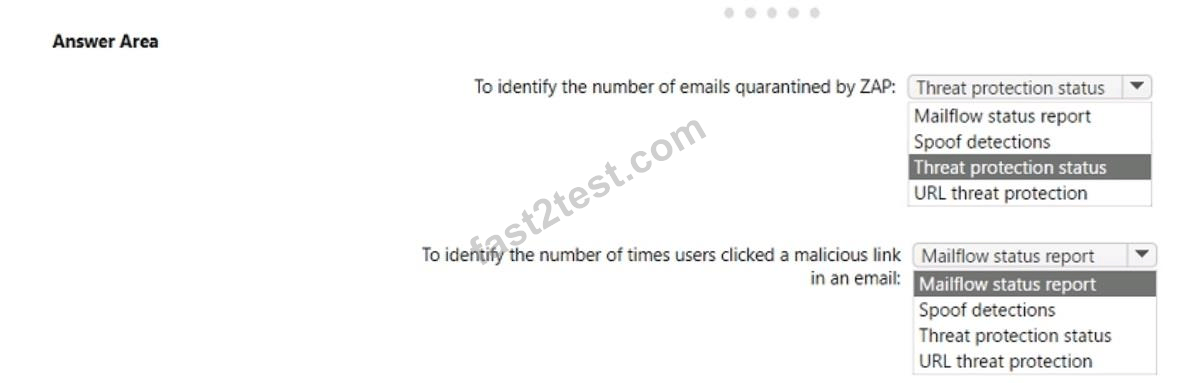
You need to identify the following information:
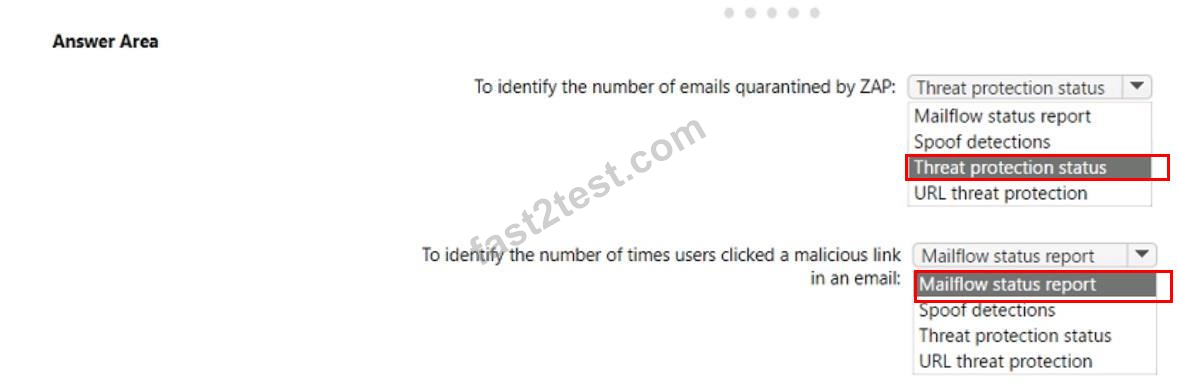
* The number of email messages quarantined by zero-hour auto purge (ZAP)
* The number of times users clicked a malicious link in an email message Which Email & collaboration report should you use? To answer, select the appropriate options in the answer are a. NOTE: Each correct selection is worth one point.
The subscription has the default inbound anti-spam policy and a custom Safe Attachments policy.
You need to identify the following information:
* The number of email messages quarantined by zero-hour auto purge (ZAP)
* The number of times users clicked a malicious link in an email message Which Email & collaboration report should you use? To answer, select the appropriate options in the answer are a. NOTE: Each correct selection is worth one point.
Correct Answer:
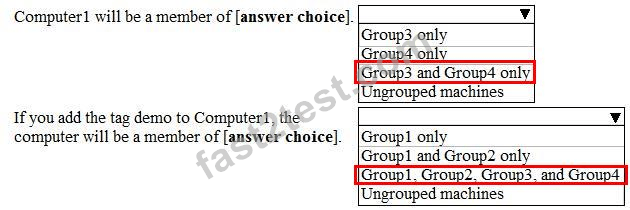
Your company uses Windows Defender Advanced Threat Protection (ATP). Windows Defender ATP includes the machine groups shown in the following table.

You onboard a computer named computer1 to Windows Defender ATP as shown in the following exhibit.
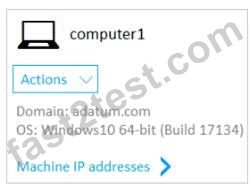
Use the drop-down menus to select the answer choice that completes each statement based on the information presented in the graphic.
NOTE: Each correct selection is worth one point.
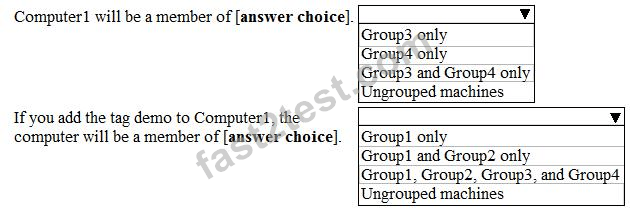
You onboard a computer named computer1 to Windows Defender ATP as shown in the following exhibit.
Use the drop-down menus to select the answer choice that completes each statement based on the information presented in the graphic.
NOTE: Each correct selection is worth one point.
Correct Answer:
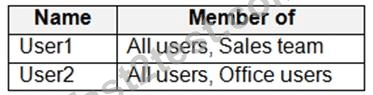
You have a Microsoft 365 subscription that contains three groups named All users, Sales team, and Office users, and two users shown in the following table.
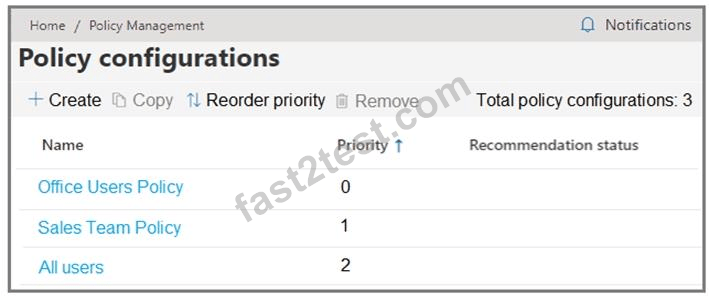
In Microsoft Endpoint Manager, you have the Policies for Office apps settings shown in the following exhibit.
The policies use the settings shown in the following table.
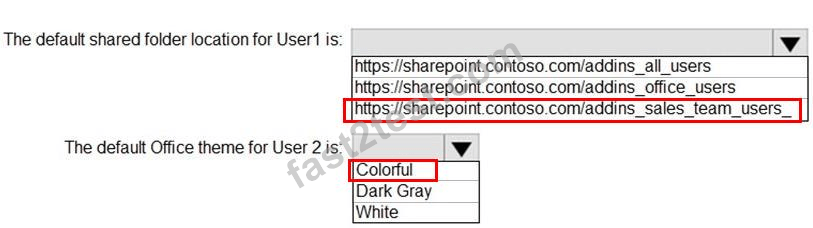
What is the default share folder location for User1 and the default Office theme for User2? To answer, select the appropriate options in the answer area.
NOTE: Each correct selection is worth one point.
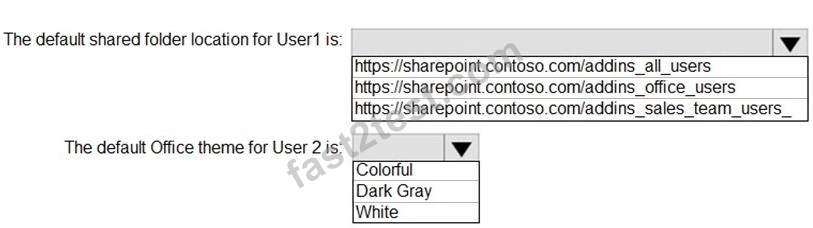
In Microsoft Endpoint Manager, you have the Policies for Office apps settings shown in the following exhibit.
The policies use the settings shown in the following table.
What is the default share folder location for User1 and the default Office theme for User2? To answer, select the appropriate options in the answer area.
NOTE: Each correct selection is worth one point.
Correct Answer:
Reference:
https://docs.microsoft.com/en-us/deployoffice/overview-office-cloud-policy-service
You have a Microsoft 365 tenant.
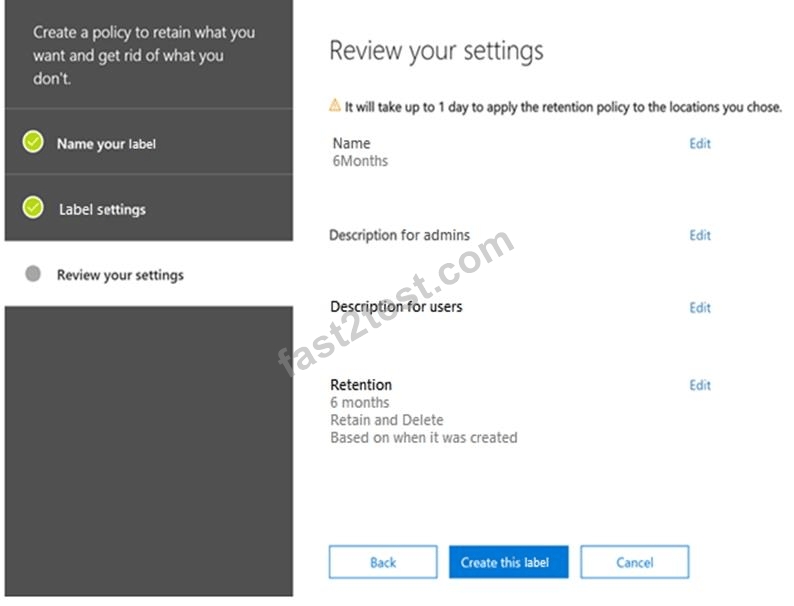
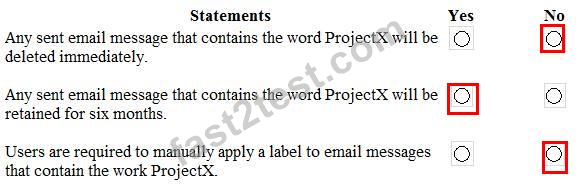
You create a retention label as shown in the Retention Label exhibit. (Click the Retention Label tab.)
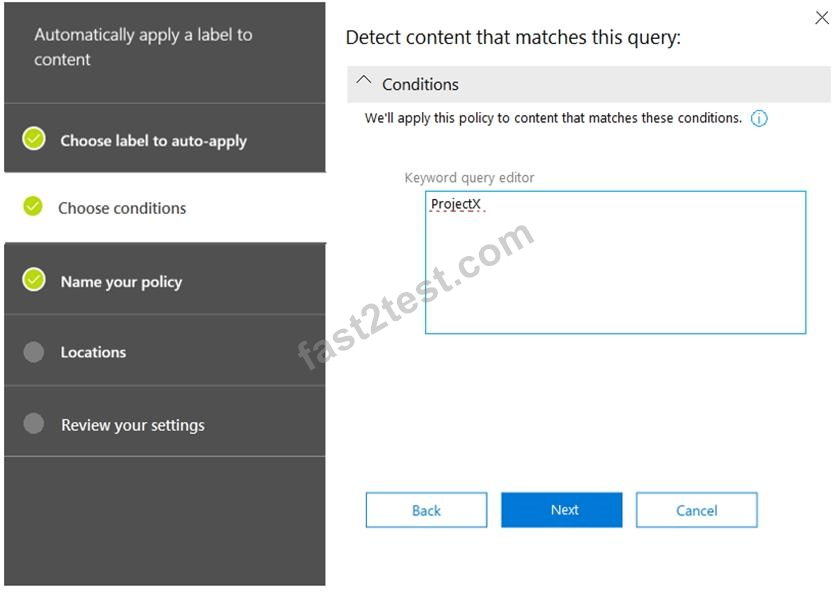
You create a label policy as shown in the Label Policy Exhibit. (Click the Label Policy tab.)
The label policy is configured as shown in the following table.

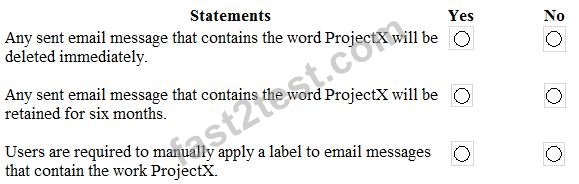
For each of the following statements, select Yes if the statement is true. Otherwise, select No.
NOTE: Each correct selection is worth one point.
You create a retention label as shown in the Retention Label exhibit. (Click the Retention Label tab.)
You create a label policy as shown in the Label Policy Exhibit. (Click the Label Policy tab.)
The label policy is configured as shown in the following table.
For each of the following statements, select Yes if the statement is true. Otherwise, select No.
NOTE: Each correct selection is worth one point.
Correct Answer:
Reference:
https://docs.microsoft.com/en-us/office365/securitycompliance/retention-policies
You have a Microsoft 365 E5 subscription that uses Microsoft Defender Advanced Threat Protection (Microsoft Defender ATP).
When users attempt to access the portal of a partner company, they receive the message shown in the following exhibit.
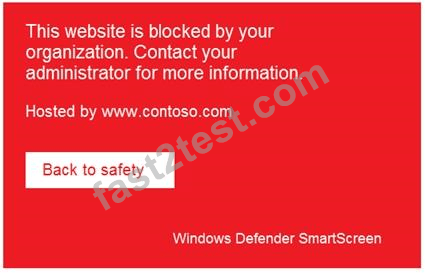
You need to enable user access to the partner company's portal.
Which Microsoft Defender ATP setting should you modify?
When users attempt to access the portal of a partner company, they receive the message shown in the following exhibit.
You need to enable user access to the partner company's portal.
Which Microsoft Defender ATP setting should you modify?
Correct Answer: E
Vote an answer
Explanation: Only visible for Fast2test members. You can sign-up / login (it's free).
You have a Microsoft 365 E5 tenant that contains 500 Windows 10 devices. The devices are enrolled in Microsoft intune.
You plan to use Endpoint analytics to identify hardware issues.
You need to enable Window health monitoring on the devices to support Endpoint analytics What should you do?
You plan to use Endpoint analytics to identify hardware issues.
You need to enable Window health monitoring on the devices to support Endpoint analytics What should you do?
Correct Answer: B
Vote an answer
You have a Microsoft 365 E5 tenant.
You need to ensure that when a document containing a credit card number is added to the tenant, the document is encrypted.
Which policy should you use?
You need to ensure that when a document containing a credit card number is added to the tenant, the document is encrypted.
Which policy should you use?
Correct Answer: A
Vote an answer
Explanation: Only visible for Fast2test members. You can sign-up / login (it's free).
You have a Microsoft 365 E5 tenant that contains the devices shown in the following table.

You add custom apps to the private store in Microsoft Store Business.
You plan to create a policy to show only the private store in Microsoft Store for Business.
To which devices can the policy be applied?
You add custom apps to the private store in Microsoft Store Business.
You plan to create a policy to show only the private store in Microsoft Store for Business.
To which devices can the policy be applied?
Correct Answer: C
Vote an answer
You have a Microsoft 365 subscription.
All users have their email stored in Microsoft Exchange Online.
In the mailbox of a user named User1. you need to preserve a copy of all the email messages that contain the word ProjectX.
What should you do first?
All users have their email stored in Microsoft Exchange Online.
In the mailbox of a user named User1. you need to preserve a copy of all the email messages that contain the word ProjectX.
What should you do first?
Correct Answer: D
Vote an answer
You have 2,500 Windows 10 devices and a Microsoft 365 E5 tenant that contains two users named User1 and User2. The devices are not enrollment in Microsoft Intune.
In Microsoft Endpoint Manager, the Device limit restrictions are configured as shown in the following exhibit.

In Azure Active Directory (Azure AD), the Device settings are configured as shown in the following exhibit.
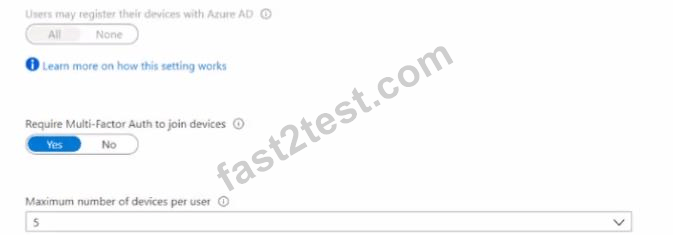
From Microsoft Endpoint Manager, you add User2 as a device enrollment manager (DEM).
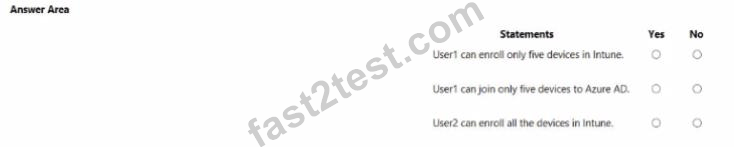
For each of the following statement, select Yes if the statement is true. Otherwise, select No.
NOTE: Each correct selection is worth one point.
In Microsoft Endpoint Manager, the Device limit restrictions are configured as shown in the following exhibit.
In Azure Active Directory (Azure AD), the Device settings are configured as shown in the following exhibit.
From Microsoft Endpoint Manager, you add User2 as a device enrollment manager (DEM).
For each of the following statement, select Yes if the statement is true. Otherwise, select No.
NOTE: Each correct selection is worth one point.
Correct Answer:

Note: This question is part of a series of questions that present the same scenario. Each question in the series contains a unique solution that might meet the stated goals. Some question sets might have more than one correct solution, while others might not have a correct solution.
After you answer a question in this section, you will NOT be able to return to it. As a result, these questions will not appear in the review screen.
You have an Azure Active Directory (Azure AD) tenant that contains a user named User1.
Your company purchases a Microsoft 365 subscription.
You need to ensure that User1 is assigned the required role to create file policies and manage alerts in the Cloud App Security admin center.
Solution: From the Cloud App Security admin center, you assign the App/instance admin role for all Microsoft Online Services to User1.
Does this meet the goal?
After you answer a question in this section, you will NOT be able to return to it. As a result, these questions will not appear in the review screen.
You have an Azure Active Directory (Azure AD) tenant that contains a user named User1.
Your company purchases a Microsoft 365 subscription.
You need to ensure that User1 is assigned the required role to create file policies and manage alerts in the Cloud App Security admin center.
Solution: From the Cloud App Security admin center, you assign the App/instance admin role for all Microsoft Online Services to User1.
Does this meet the goal?
Correct Answer: A
Vote an answer
Explanation: Only visible for Fast2test members. You can sign-up / login (it's free).
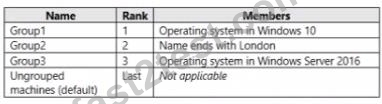
You use Microsoft Defender for Endpoint.
You have the Microsoft Defender for Endpoint device groups shown in the following table
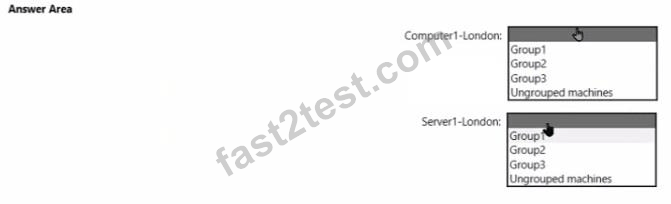
You plan to onboard computers to Microsoft Defender for Endpoint as shown in the following table.
You have the Microsoft Defender for Endpoint device groups shown in the following table
You plan to onboard computers to Microsoft Defender for Endpoint as shown in the following table.
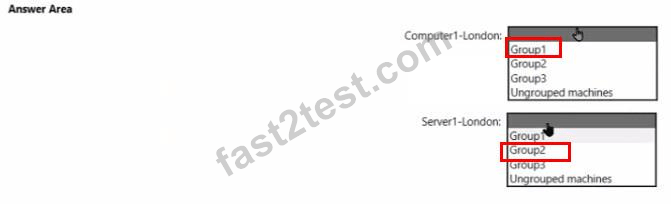
Correct Answer:
Your company has a Microsoft 365 subscription that uses an Azure Active Directory (Azure AD) tenant named contoso.com.
The company purchases a cloud app named App1 that supports Microsoft (loud App Security monitoring.
You configure App1 to be available from the My Apps portal.
You need to ensure that you can monitor App1 from Cloud App Security
What should you do?
The company purchases a cloud app named App1 that supports Microsoft (loud App Security monitoring.
You configure App1 to be available from the My Apps portal.
You need to ensure that you can monitor App1 from Cloud App Security
What should you do?
Correct Answer: B
Vote an answer
Explanation: Only visible for Fast2test members. You can sign-up / login (it's free).
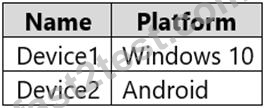
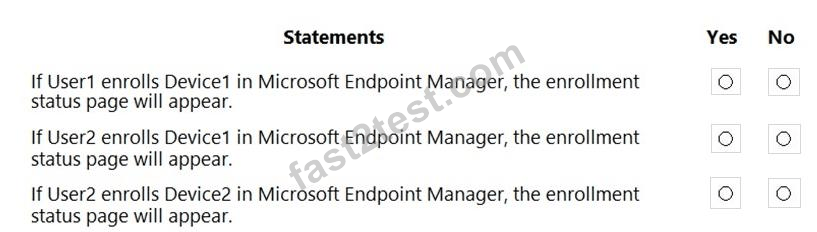
You have a Microsoft 365 E5 tenant that contains the users shown in the following table.

You purchase the devices shown in the following table.
In Microsoft Endpoint Manager, you create an enrollment status page profile that has the following settings:
Show app and profile configuration progress: Yes
Allow users to collect logs about installation errors: Yes
Only show page to devices provisioned by out-of-box experience (OOBE): No Assignments: Group2 For each of the following statements, select Yes if the statement is true. Otherwise, select No.
NOTE: Each correct selection is worth one point.
You purchase the devices shown in the following table.
In Microsoft Endpoint Manager, you create an enrollment status page profile that has the following settings:
Show app and profile configuration progress: Yes
Allow users to collect logs about installation errors: Yes
Only show page to devices provisioned by out-of-box experience (OOBE): No Assignments: Group2 For each of the following statements, select Yes if the statement is true. Otherwise, select No.
NOTE: Each correct selection is worth one point.
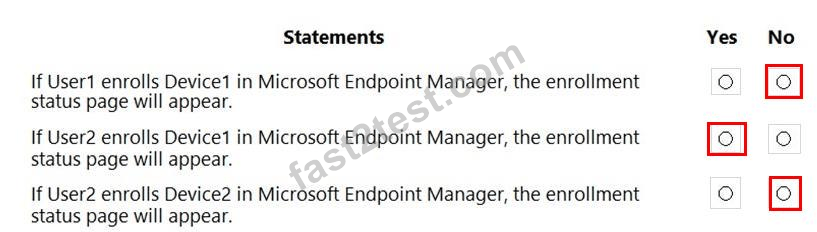
Correct Answer:
Reference:
https://docs.microsoft.com/en-us/mem/intune/enrollment/windows-enrollment-status