
Exam MB-280 Topic 2 Question 59 Discussion
Actual exam question for Microsoft's MB-280 exam
Question #: 59
Topic #: 2
Question #: 59
Topic #: 2
You are configuring Dynamics 365 Sales as part of a new implementation at your organization. Your organization has Sales Professional licensing.
Your organization sells over 100 different types of products across different divisions. A lot of selling occurs at conferences where sellers meet prospects and gather business cards to create leads.
After reviewing the requirements from your business stakeholders, you identify that:
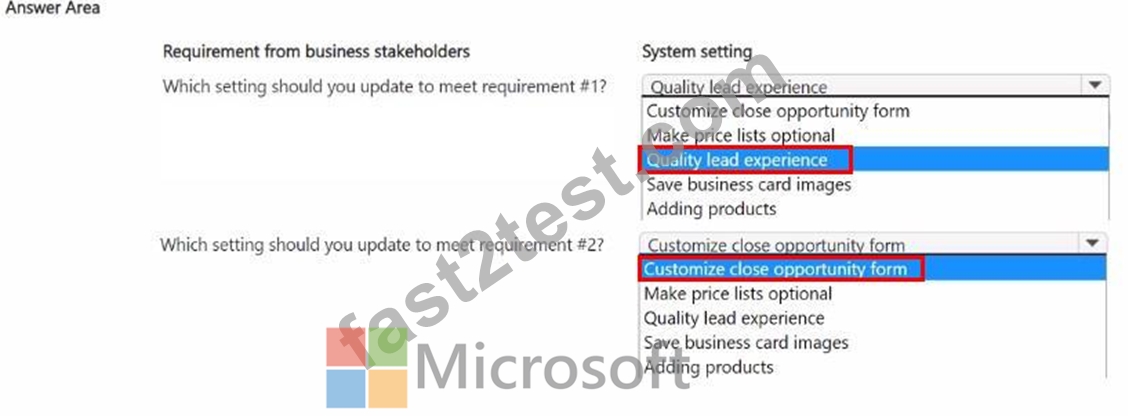
1. Sellers sometimes only want to convert leads gathered at events to contacts before they start tracking any deals with that contact.
2. Sellers must be given multiple different options for specifying the final status of deals they have been tracking.
Your current System Settings is as follows:

Use the drop-down menus to select the answer choice that answers each question. NOTE: Each correct selection is worth one point.

Your organization sells over 100 different types of products across different divisions. A lot of selling occurs at conferences where sellers meet prospects and gather business cards to create leads.
After reviewing the requirements from your business stakeholders, you identify that:
1. Sellers sometimes only want to convert leads gathered at events to contacts before they start tracking any deals with that contact.
2. Sellers must be given multiple different options for specifying the final status of deals they have been tracking.
Your current System Settings is as follows:
Use the drop-down menus to select the answer choice that answers each question. NOTE: Each correct selection is worth one point.
Suggested Answer:
Reference:
Steps to Configure the Quality Lead Experience Setting:
Navigate to Settings > Administration > System Settings.
Go to the Sales tab.
Set Qualify lead experience to "Yes" to allow flexibility in lead conversion.
Requirement #2 Explanation:
The requirement states that sellers need different options for specifying the final status of deals.
The Customize close opportunity form setting allows customization of the form where users specify the status reason when closing an opportunity.
By enabling this, you can provide multiple status options, helping sellers specify various outcomes for closed deals (e.g., different statuses for won or lost deals).
Steps to Configure the Customize Close Opportunity Form Setting:
Navigate to Settings > Administration > System Settings.
Go to the Sales tab.
Set Customize close opportunity form to "Yes" to allow adding specific status options when an opportunity is closed.
By setting these configurations, Dynamics 365 Sales will support both the need for flexible lead qualification and provide detailed status options for opportunity closures, aligning with the organization's requirements.
by Ward at Feb 06, 2025, 06:12 AM
Contact Us
If you have any question please leave me your email address, we will reply and send email to you in 12 hours.
Our Working Time: ( GMT 0:00-15:00 ) From Monday to Saturday
Support: Contact now
Comments
Upvoting a comment with a selected answer will also increase the vote count towards that answer by one. So if you see a comment that you already agree with, you can upvote it instead of posting a new comment.
Report Comment
Commenting
You can sign-up / login (it's free).