

[Mar-2026] Dumps Practice Exam Questions Study Guide for the 220-1102 Exam
220-1102 Dumps with Practice Exam Questions Answers
CompTIA 220-1102 exam is designed for individuals who have already passed the Core 1 exam and are seeking to obtain the CompTIA A+ certification. 220-1102 exam consists of 90 multiple-choice and performance-based questions that need to be completed within 90 minutes. 220-1102 exam focuses on several key areas, including operating systems, security, software troubleshooting, and operational procedures.
NEW QUESTION # 116
Which of the following combinations meets the requirements for mobile device multifactor authentication?
- A. Password and PIN
- B. Swipe and PIN
- C. Password and swipe
- D. Fingerprint and password
Answer: D
Explanation:
Multifactor authentication (MFA) requires the use of two or more verification factors to gain access to a resource such as an application, online account, or a VPN. The factors are categorized into something you know (like a password or PIN), something you have (like a security token or a smartphone), and something you are (like a biometric verification such as a fingerprint).
Fingerprint and password:This combination meets the criteria for MFA as it uses two different categories of authentication factors: "something you are" (fingerprint) and "something you know" (password). This enhances security by combining two distinct methods of authentication.
Other combinations mentioned:
Password and PIN:Both of these factors fall under the same category of "something you know," and hence, do not constitute multifactor authentication.
Password and swipe:Swiping a pattern is similar to a password in that it is something you know, so this does not qualify as multifactor authentication.
Swipe and PIN:Again, both of these are "something you know" and do not qualify as multifactor authentication since they fall under the same category.
NEW QUESTION # 117
Which of the following is a data security standard for protecting credit cards?
- A. PHI
- B. GDPR
- C. PCI
- D. NIST
Answer: C
Explanation:
Explanation
The Payment Card Industry Data Security Standard (PCI DSS) is a set of security standards designed to ensure that ALL companies that accept, process, store or transmit credit card information maintain a secure environment.
NEW QUESTION # 118
A help desk technician is preparing to upgrade the company's desktop OS from Windows 7 to Windows 10.
The technician needs to ensure the upgrade will preserve the users' applications and data but also minimize the time and effort required for the upgrade. Which of the following would the technician most likely do?
- A. Use the Update Assistant tool.
- B. Perform a clean install of the new OS.
- C. Utilize the Windows Update tool.
- D. Utilize the "Refresh this PC" option in the Settings menu.
Answer: A
Explanation:
The Update Assistant tool is designed to perform an in-place upgrade to Windows 10 that preserves user applications, data, and settings while automating much of the upgrade process. A clean install (A) wipes all data and applications, which is more time-consuming and risky. The Windows Update tool (B) is typically for updating the current OS version, not a major version upgrade like Windows 7 to 10. The "Refresh this PC" option (C) reinstalls Windows but removes applications, so it doesn't preserve apps. Core 2 operating system objectives identify the Update Assistant as the preferred method to minimize effort and preserve user data during major upgrades.
NEW QUESTION # 119
A technician is selling up a newly built computer. Which of the following is the FASTEST way for the technician to install Windows 10?
- A. In-place upgrade
- B. Unattended installation
- C. Factory reset
- D. System Restore
Answer: B
Explanation:
Explanation
An unattended installation is the fastest way to install Windows 10 on a newly built computer. It uses an answer file that contains all the configuration settings and preferences for the installation, such as language, product key, partition size, etc. It does not require any user interaction or input during the installation process.
Factory reset, System Restore and in-place upgrade are not methods of installing Windows 10 on a new computer, but ways of restoring or updating an existing Windows installation. Verified References:
https://www.comptia.org/blog/what-is-an-unattended-installation https://www.comptia.org/certifications/a
NEW QUESTION # 120
A technician is setting up a backup method on a workstation that only requires two sets of tapes to restore.
Which of the following would BEST accomplish this task?
- A. Off-site backup
- B. Full backup
- C. Differential backup
- D. Incremental backup
Answer: B
Explanation:
Explanation
A full backup involves creating a copy of all data on the workstation, including system files and user-created data, and storing it on a set of tapes. This ensures that all data is backed up, and ensures that the data can be restored in the event of a system failure or data loss.
NEW QUESTION # 121
A user is unable to access the company's internal network on a separate subnet. A help desk technician verifies the user's credentials, and the user has the appropriate permissions to access the network. The technician checks the network and finds the connection is stable. No other users are having this issue. Which of the following should the technician do next?
- A. Consult with the firewall team to see If the user's IP address Is blocked.
- B. Run a virus scan on the user's workstation.
- C. Update the network drivers on the user's workstation.
- D. Delete the user's credentials and create new ones.
Answer: A
Explanation:
In this scenario, the user cannot access a separate subnet, and all other checks (credentials, network stability, and permissions) have been verified. The next logical step is to check if the user's IP address is being blocked by a firewall.
Option A: Consult with the firewall team to see if the user's IP address is blockedFirewalls can block specific IP addresses, preventing access to certain network segments. Given the problem's nature and the steps already taken, this is the most logical next step to ensure the user's IP is not inadvertently blocked.
Option B: Delete the user's credentials and create new onesThis step is unnecessary since the credentials have already been verified as correct.
Option C: Run a virus scan on the user's workstationWhile important for overall security, a virus scan is unlikely to resolve an issue specific to accessing a subnet if the problem does not affect other users.
Option D: Update the network drivers on the user's workstationIf the network connection is stable and the issue is isolated to accessing a specific subnet, network drivers are unlikely to be the cause.
Reference:
CompTIA A+ 220-1102 Objective 2.0 (Security), particularly firewall settings.
NEW QUESTION # 122
The findings from a security audit indicate the risk of data loss from lost or stolen laptops is high. The company wants to reduce this risk with minimal impact to users who want to use their laptops when not on the network. Which of the following would BEST reduce this risk for Windows laptop users?
- A. Requiring strong passwords
- B. Enabling BitLocker on all hard drives
- C. Disabling cached credentials
- D. Requiring MFA to sign on
Answer: B
Explanation:
Explanation
BitLocker is a disk encryption tool that can be used to encrypt the hard drive of a Windows laptop. This will protect the data stored on the drive in the event that the laptop is lost or stolen, and will help to reduce the risk of data loss. Additionally, BitLocker can be configured to require a PIN or other authentication in order to unlock the drive, providing an additional layer of security.
NEW QUESTION # 123
A company is retiring old workstations and needs a certificate of destruction for all hard drives. Which of the following would be BEST to perform on the hard drives to ensure the data is unrecoverable? (Select TWO).
- A. Recycling
- B. Erasing
- C. Low-level formatting
- D. Drilling
- E. Incinerating
- F. Standard formatting
Answer: D,E
Explanation:
Drilling and incinerating are physical destruction methods that make the data on hard drives unrecoverable. Standard formatting, erasing and low-level formatting are logical methods that can be reversed with data recovery tools. Recycling is not a destruction method at all. Verified Reference: https://www.comptia.org/blog/what-is-a-certificate-of-destruction https://www.comptia.org/certifications/a
NEW QUESTION # 124
Which of the following types of malicious software is most likely to demand payments in cryptocurrency?
- A. Keylogger
- B. Rootkit
- C. Cryptomining
- D. Ransomware
Answer: D
Explanation:
Comprehensive and Detailed In-Depth
Ransomware is a type of malware that encrypts files and demands payment (usually in cryptocurrency) to decrypt them.
B . Keylogger - Tracks keystrokes but does not demand payment.
C . Cryptomining - Uses system resources to mine cryptocurrency without the user's consent.
D . Rootkit - Hides malicious software but does not demand payment.
Reference:
CompTIA A+ 220-1102, Objective 2.5 - Common Security Threats
NEW QUESTION # 125
Security software was accidentally uninstalled from all servers in the environment. After requesting the same version of the software be reinstalled, the security analyst learns that a change request will need to be filled out. Which of the following is the BEST reason to follow the change management process in this scenario?
- A. A risk assessment can be performed to determine if the software is needed.
- B. A rollback plan can be implemented in case the software breaks an application.
- C. End users can be aware of the scope of the change.
- D. Owners can be notified a change is being made and can monitor it for performance impact. Most Voted
Answer: D
Explanation:
Explanation
change management process can help ensure that owners are notified of changes being made and can monitor them for performance impact (A). This can help prevent unexpected issues from arising.
NEW QUESTION # 126
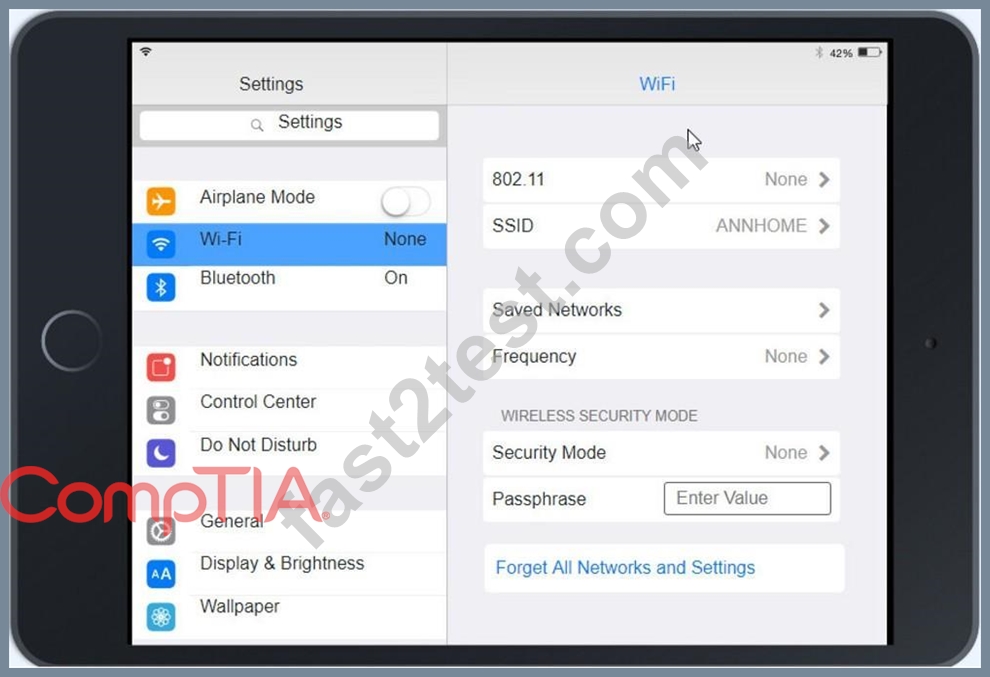
Ann, a CEO, has purchased a new consumer-class tablet for personal use, but she is unable to connect it to the company's wireless network. All the corporate laptops are connecting without issue. She has asked you to assist with getting the device online.
INSTRUCTIONS
Review the network diagrams and device configurations to determine the cause of the problem and resolve any discovered issues.
If at any time you would like to bring back the initial state of the simulation, please click the Reset All button.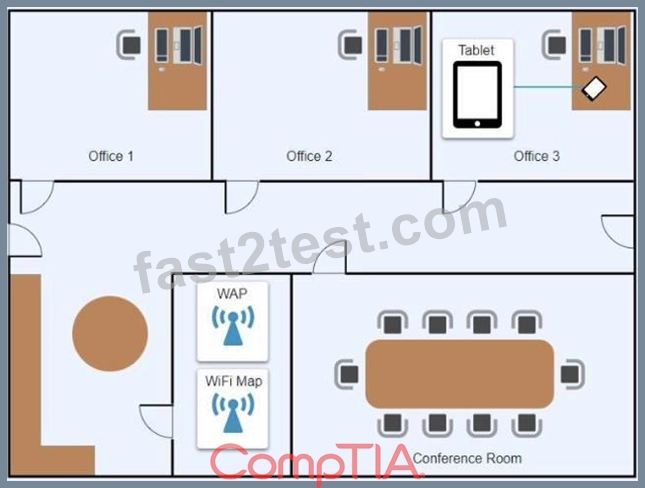
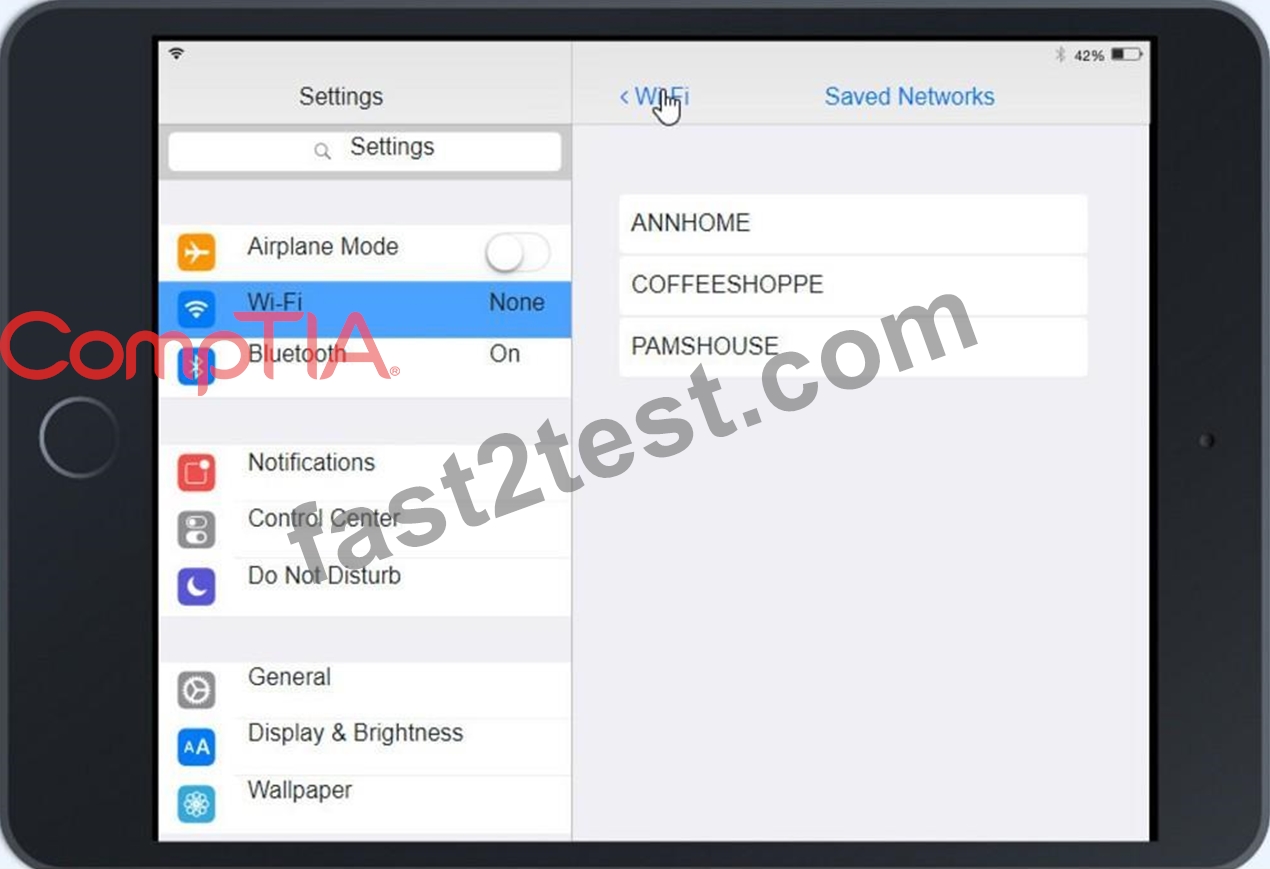
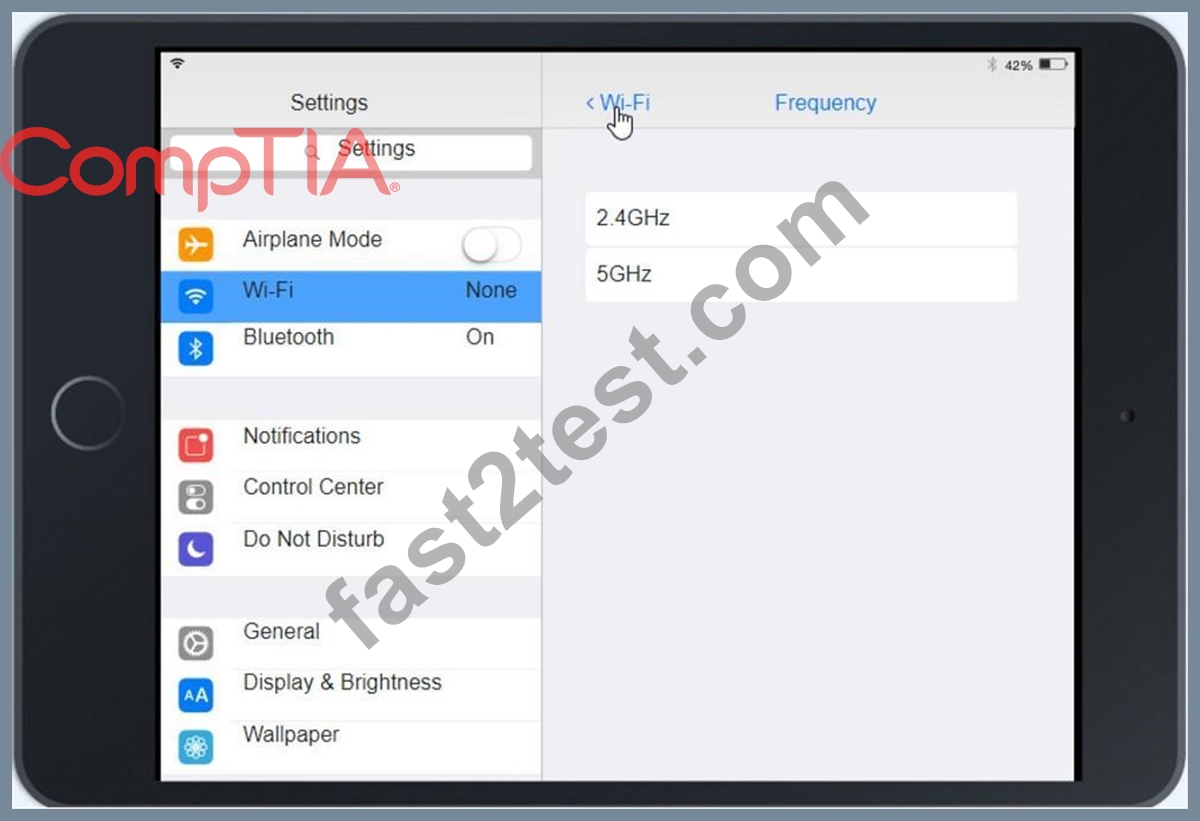
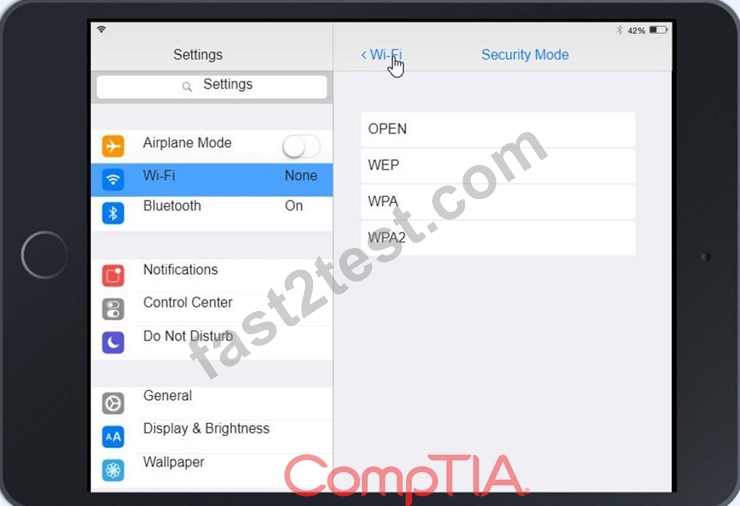
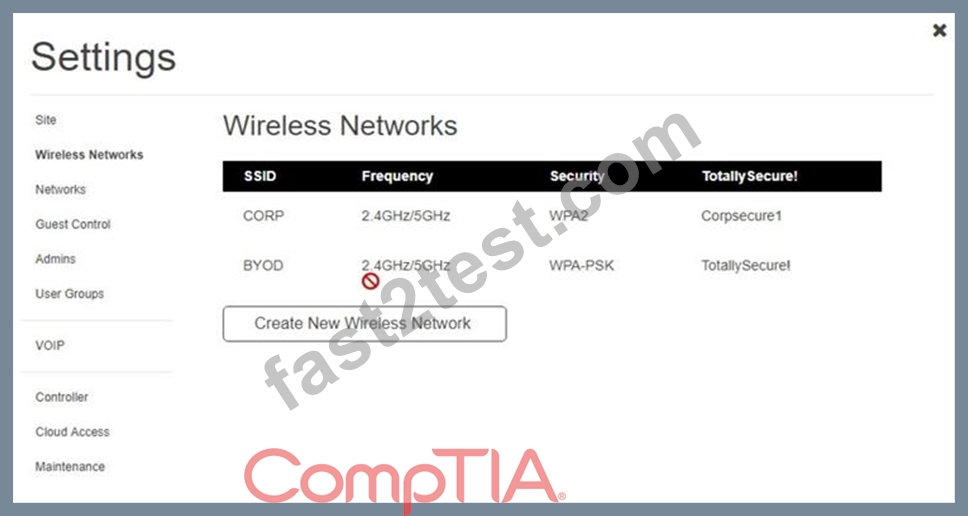
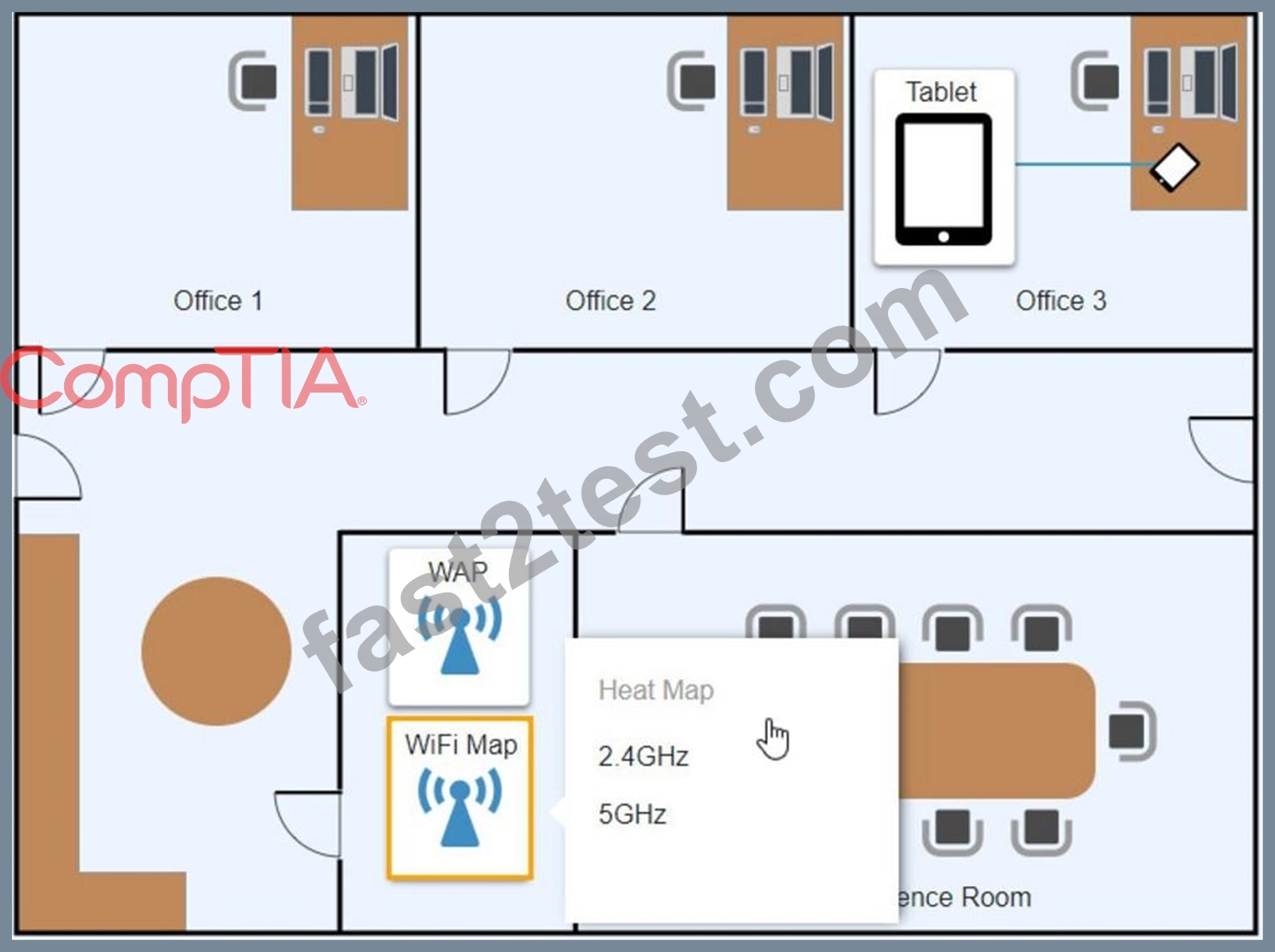
Answer:
Explanation:
See the Explanation below:
Explanation
Graphical user interface, application Description automatically generated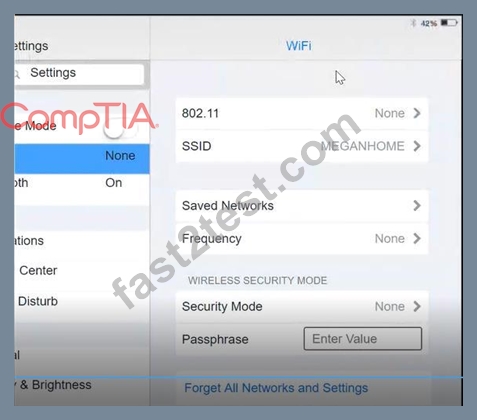
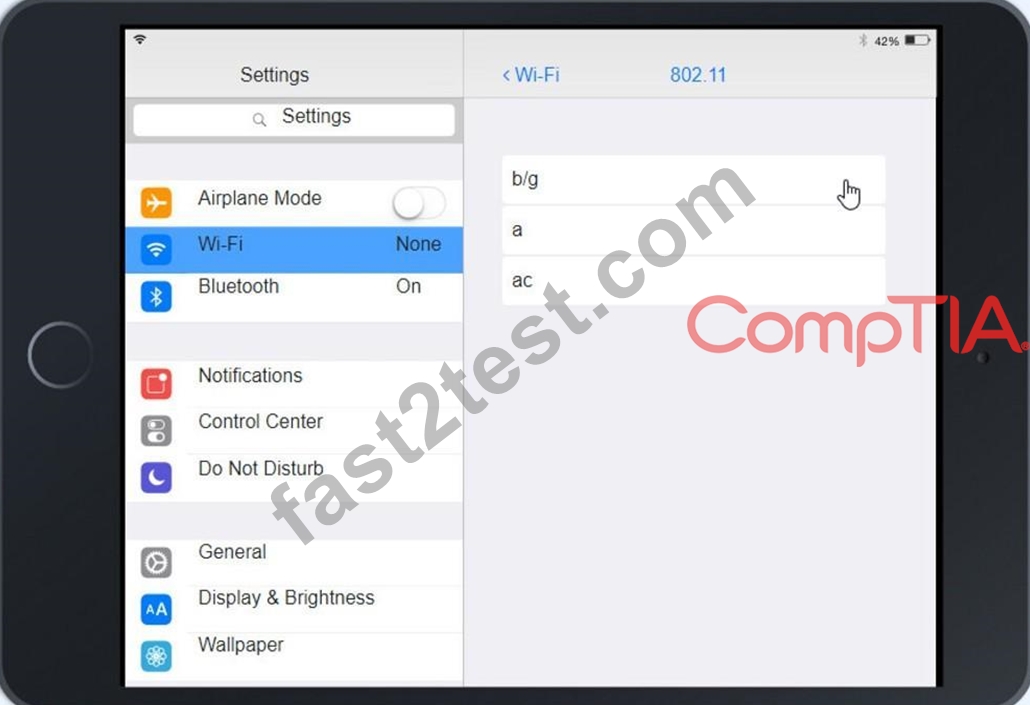
Click on 802.11 and Select ac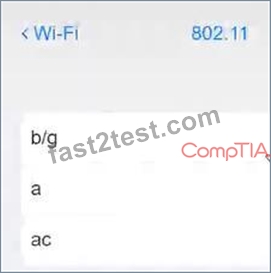
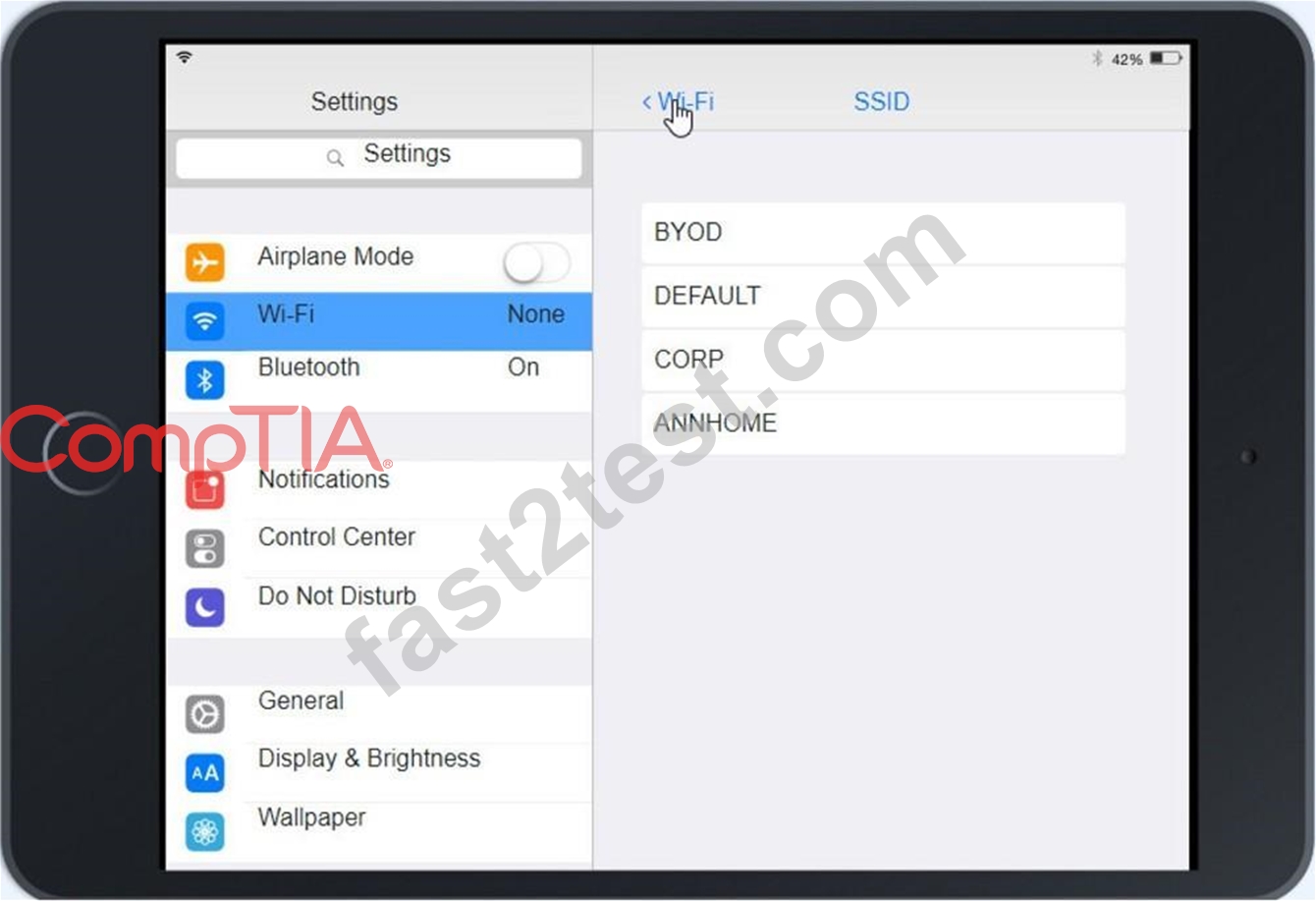
Graphical user interface, application Description automatically generated Click on SSID and select CORP Graphical user interface, text, application, Teams Description automatically generated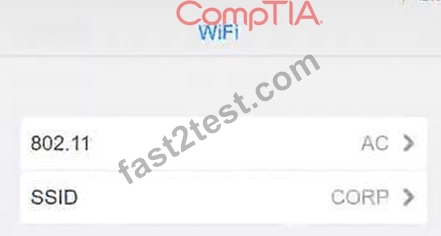
Click on Frequency and select 5GHz
A picture containing background pattern Description automatically generated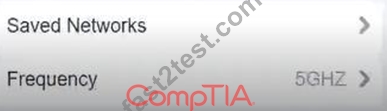
At Wireless Security Mode, Click on Security Mode
Graphical user interface, text, application Description automatically generated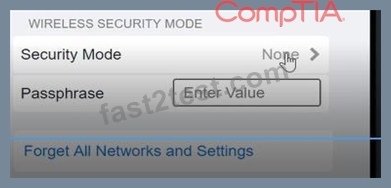
Select the WPA2
Graphical user interface, application, Teams Description automatically generated with medium confidence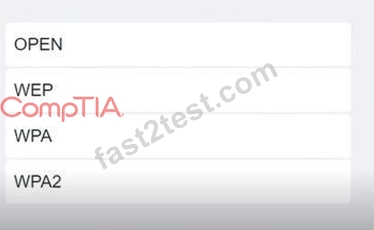
Ann needs to connect to the BYOD SSID, using 2.4GHZ. The selected security method chose should be WPA PSK, and the password should be set to TotallySecret.
Graphical user interface, application Description automatically generated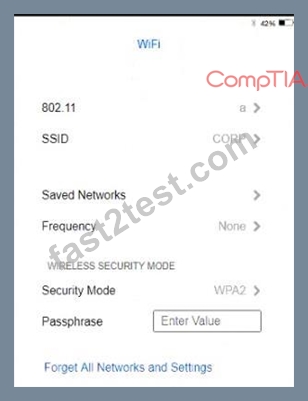
NEW QUESTION # 127
Which of the following file extensions are commonly used to install applications on a macOS machine?
(Select THREE).
- A. .Pkg
- B. .deb
- C. .msi
- D. .mac
- E. .apk
- F. .app
- G. .appx
- H. .dmg
Answer: A,F,H
Explanation:
https://support.microsoft.com/en-us/windows/common-file-name-extensions-in-windows-da4a4430-8e76-89c5-5
.pkg and .dmg are files used to distribute and install applications on macOS. .pkg files are installer packages that may contain multiple files and executable code, while .dmg files are disk images that can contain a single bundled application or multiple applications. .app files are typically the main executable files for macOS applications. The other options listed are file extensions for applications or installers on other platforms (such as .deb for Debian-based Linux systems, .msi for Windows, and .apk for Android). This information is covered in the Comptia A+ Core2 documents/guide under the Mac OS section.
NEW QUESTION # 128
A technician discovers user input has been captured by a malicious actor. Which of the following malware types is MOST likely being used?
- A. Spear phishing
- B. Keylogger
- C. Rootkit
- D. Cryptominers
Answer: B
Explanation:
A keylogger is a type of malware that captures user input, such as keystrokes, mouse clicks, and clipboard data, and sends it to a malicious actor. Keyloggers can be used to steal passwords, credit card numbers, personal information, and other sensitive data.
Reference: CompTIA A+ Core 2 Exam Objectives, Section 5.1
NEW QUESTION # 129
A technician is investigating an employee's smartphone that has the following symptoms
* The device is hot even when it is not in use.
* Applications crash, especially when others are launched
* Certain applications, such as GPS, are in portrait mode when they should be in landscape mode Which of the following can the technician do to MOST likely resolve these issues with minimal impact? (Select TWO).
- A. Reinstall the applications that have crashed.
- B. Perform a factory reset
- C. Update the device's operating system
- D. Close unnecessary applications
- E. Activate airplane mode.
- F. Turn on autorotation
Answer: D,F
NEW QUESTION # 130
A user attempts to install additional software and receives a UAC prompt. Which of the following is the BEST way to resolve this issue?
- A. Disable the guest account.
- B. Configure Windows Defender Firewall to allow access to all networks.
- C. Create a Microsoft account.
- D. Add a user account to the local administrator's group.
Answer: D
Explanation:
A user account that belongs to the local administrator's group has the permission to install software on a Windows machine. If a user receives a UAC (user account control) prompt when trying to install software, it means the user does not have enough privileges and needs to enter an administrator's password or switch to an administrator's account. Adding the user account to the local administrator's group can resolve this issue. Configuring Windows Defender Firewall, creating a Microsoft account and disabling the guest account are not related to this issue. Verified Reference: https://www.comptia.org/blog/user-account-control https://www.comptia.org/certifications/a
NEW QUESTION # 131
A BSOD appears on a user's workstation monitor. The user immediately presses the power button to shut down the PC, hoping to repair the issue. The user then restarts the PC, and the BSOD reappears, so the user contacts the help desk. Which of the following should the technician use to determine the cause?
- A. System Configuration
- B. Stop code
- C. Services
- D. Event Mewer
Answer: B
Explanation:
When a Blue Screen of Death (BSOD) appears on a Windows workstation, it indicates that there is a serious problem with the operating system. The stop code displayed on the BSOD can provide valuable information to help determine the cause of the issue. The stop code is a specific error code that is associated with the BSOD, and it can help identify the root cause of the problem.
In this scenario, the user has encountered a BSOD and has restarted the PC, only to see the BSOD reappear.
This suggests that the problem is persistent and requires further investigation. By analyzing the stop code displayed on the BSOD, a technician can begin to identify the underlying issue and take appropriate actions to resolve it.
NEW QUESTION # 132
A police officer often leaves a workstation for several minutes at a time. Which of the following is the BEST way the officer can secure the workstation quickly when walking away?
- A. Configure a screensaver to lock the computer automatically after approximately 30 minutes of inactivity.
- B. Ensure no unauthorized personnel are in the area.
- C. Turn off the monitor to prevent unauthorized visibility of information.
- D. Use a key combination to lock the computer when leaving.
Answer: D
NEW QUESTION # 133
Welcome to your first day as a Fictional Company. LLC helpdesk employee. Please work the tickets in your helpdesk ticket queue.
Click on individual tickers to see the ticket details. View attachments to determine the problem.
Select the appropriate issue from the 'issue' drop-down menu. Then, select the MOST efficient resolution from the 'Resolution' drop-down menu. Finally, select the propercommand or verification to remediate or confirm your fix of the issue from the Verify Resolve drop-down menu.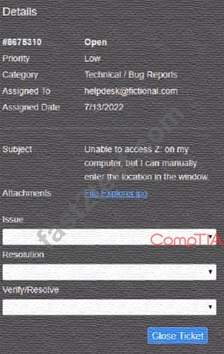
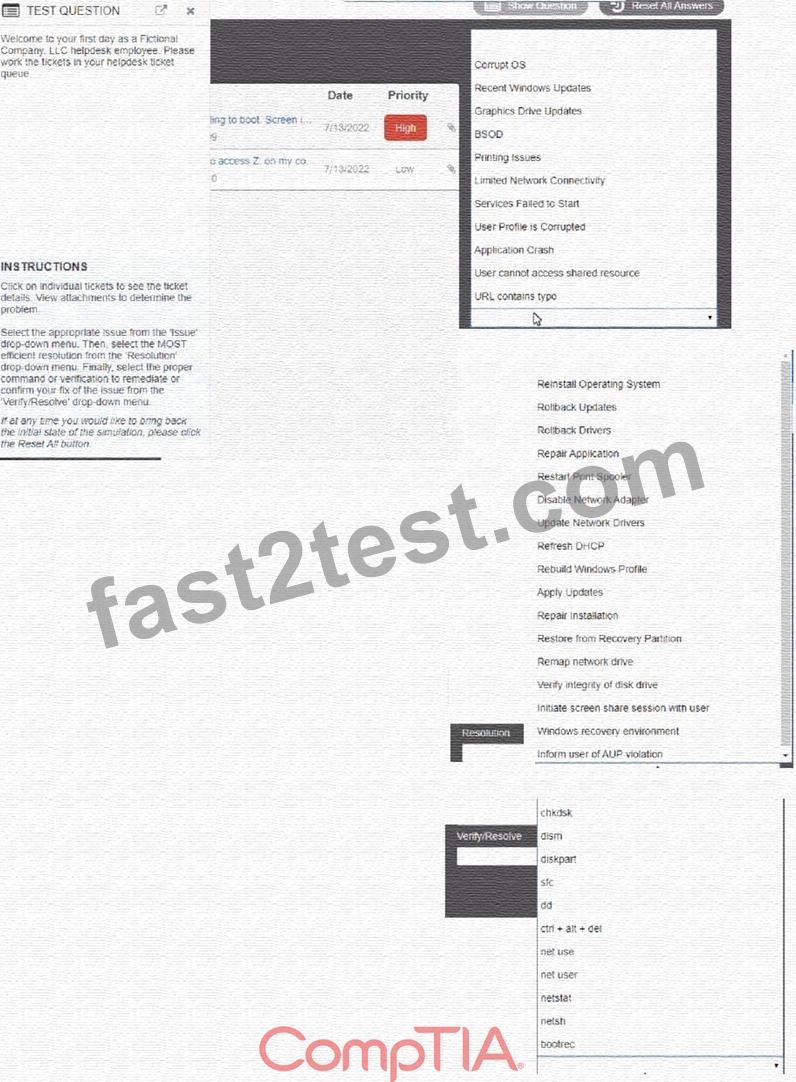
Answer:
Explanation: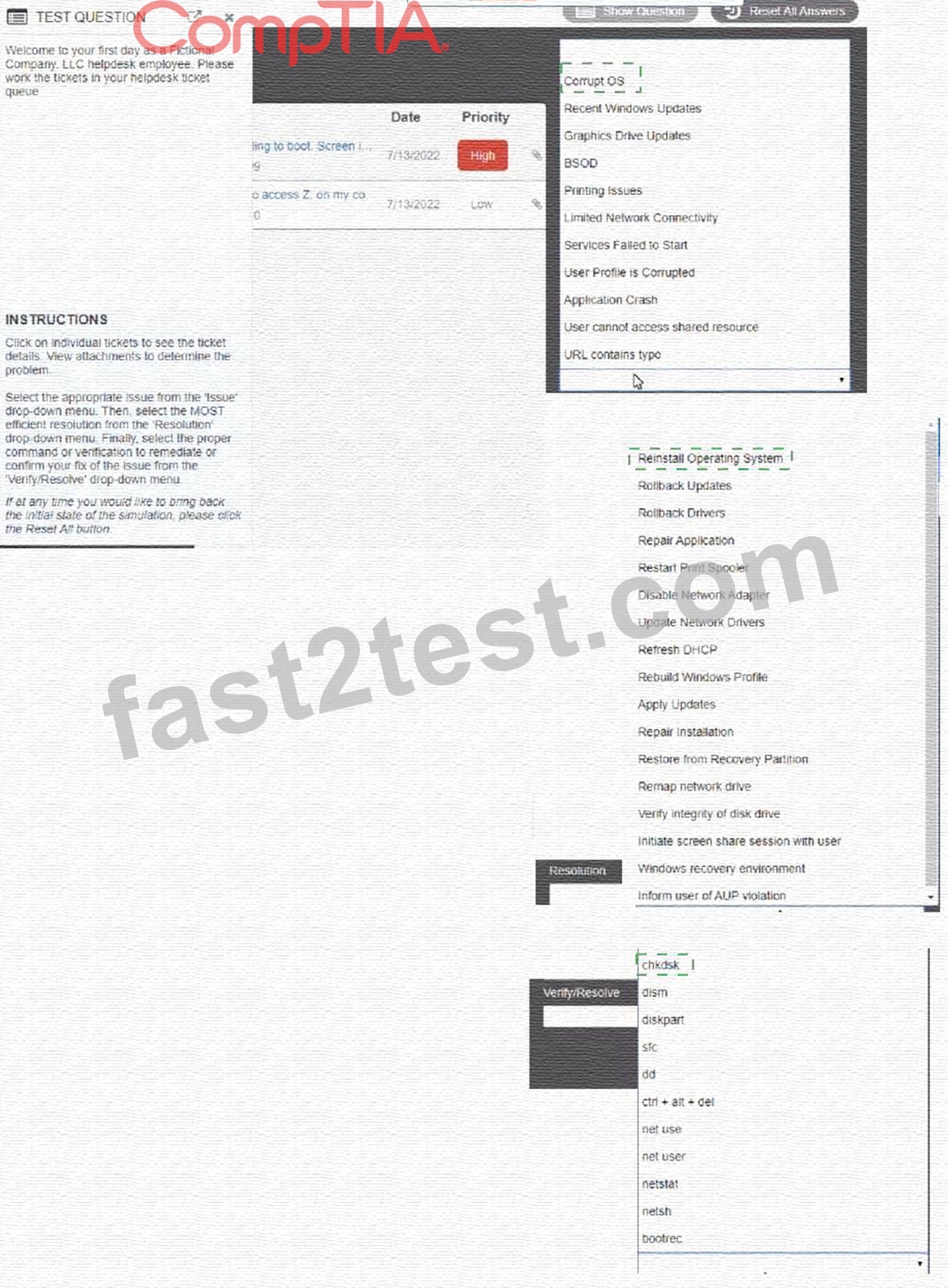
Explanation:
Graphical user interface, text, application Description automatically generated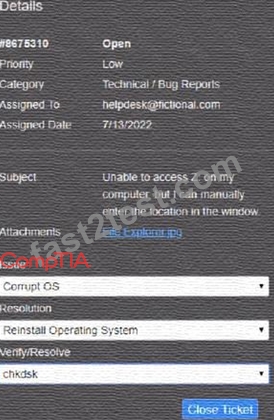
NEW QUESTION # 134
The calendar application on an employee's smartphone is experiencing frequent crashes, and the smartphone has become unresponsive. Which of the following should a technician do first to resolve the issue?
- A. Update the smartphone's OS.
- B. Reinstall the application on the smartphone.
- C. Reset the smartphone to factory settings.
- D. Reboot the smartphone.
Answer: D
Explanation:
Rebooting the smartphone is the first and simplest step to resolve the issue of frequent crashes and unresponsiveness. Rebooting clears the memory, closes the background apps, and refreshes the system. It can also fix minor glitches and bugs that may cause the calendar app or the smartphone to malfunction12. The other options are either too drastic or unnecessary. Reinstalling the application may not solve the problem if the issue is with the smartphone itself. Updating the smartphone's OS may not be possible or helpful if the device is unresponsive or incompatible. Resetting the smartphone to factory settings will erase all the data and settings on the device, which should be the last resort.
References: 1 How to Reboot an Android Smartphone or
Tablet(https://www.lifewire.com/reboot-android-smartphone-or-tablet-4127180)2 How to Restart or Shut Down a Smartphone or Tablet(https://www.computerhope.com/issues/ch001912.htm).
NEW QUESTION # 135
......
Free A+ 220-1102 Exam Question: https://www.fast2test.com/220-1102-premium-file.html
220-1102 by A+ Actual Free Exam Practice Test: https://drive.google.com/open?id=1YCqnCCfeKiX5MthMfXM-yAfretQnuMOz