

MD-102 Dumps for Pass Guaranteed - Pass MD-102 Exam 2025
MD-102 Exam Dumps - Try Best MD-102 Exam Questions from Training Expert Fast2test
NEW QUESTION # 65
You need to capture the required information for the sales department computers to meet the technical requirements.
Which Windows PowerShell command should you run first?
- A. Install-Script Get-WindowsAutoPilotInfo
- B. Get-WindowsAutoPilotInfo
- C. Install-Module WindowsAutoPilotIntune
- D. Import-AutoPilotCSV
Answer: A
Explanation:
References:
https://docs.microsoft.com/en-us/windows/deployment/windows-autopilot/existing-devices
"This topic describes how to convert Windows 7 or Windows 8.1 domain-joined computers to Windows 10 devices joined to either Azure Active Directory or Active Directory (Hybrid Azure AD Join) by using Windows Autopilot"
NEW QUESTION # 66
Which devices are registered by using the Windows Autopilot deployment service?
- A. Device1 and Device3 only
- B. Device3 only
- C. Device1 only
- D. Device1, Device2, and Device3
Answer: A
Explanation:
Scenario: Windows Autopilot Configuration
Assignments
Included groups: Group1
Excluded groups: Group2
Device1 is member of Group1.
Device2 is member of Group1 and member of Group2.
Device3 is member of Group1.
Group1 and Group2 have a Membership type of Assigned.
Exclusion takes precedence over inclusion in the following same group type scenarios.
Reference: https://learn.microsoft.com/en-us/mem/intune/apps/apps-inc-exl-assignments
NEW QUESTION # 67
Your company implements Azure AD, Microsoft 365, Microsoft Intune, and Azure Information Protection.
The company's security policy states the following:
* Personal devices do not need to be enrolled in Intune.
* Users must authenticate by using a PIN before they can access corporate email data.
* Users can use their personal iOS and Android devices to access corporate cloud services.
* Users must be prevented from copying corporate email data to a cloud storage service other than Microsoft OneDrive for Business.
You need to configure a solution to enforce the security policy.
What should you create?
- A. a data loss prevention (DIP) policy from the Microsoft Purview compliance portal
- B. a device configuration profile from the Microsoft Intune admin center
- C. an insider risk management policy from the Microsoft Purview compliance portal
- D. an app protection policy from the Microsoft Intune admin center
Answer: D
NEW QUESTION # 68
You have a Microsoft 365 E5 subscription and 100 unmanaged iPad devices.
You need to deploy a specific iOS update to the devices. Users must be prevented from manually installing a more recent version of iOS.
Which two actions should you perform? Each correct answer presents part of the solution.
NOTE: Each correct selection is worth one point.
- A. Create an iOS app provisioning profile.
- B. Enroll the devices in Microsoft Intune by using the Intune Company Portal.
- C. Create a compliance policy.
- D. Enroll the devices in Microsoft Intune by using Apple Business Manager.
- E. Create a device configuration profile.
Answer: D,E
Explanation:
To deploy a specific iOS update to the unmanaged iPad devices, you need to perform the following actions:
Enroll the devices in Microsoft Intune by using Apple Business Manager. Apple Business Manager is a service that allows you to enroll and manage iOS/iPadOS devices in bulk. You can use Apple Business Manager to assign devices to Microsoft Intune and enroll them as supervised devices. Supervised devices are devices that have more management features and restrictions than unsupervised devices. You can also use Apple Business Manager to create device groups and assign roles and permissions12.
Create a device configuration profile. A device configuration profile is a policy that you can create and assign in Microsoft Intune to configure settings on your devices. You can use a device configuration profile to manage software updates for iOS/iPadOS supervised devices. You can choose to deploy the latest update or an older update, specify a schedule for the update installation, and delay the visibility of software updates on the devices34.
The other options are not correct for this scenario because:
Enrolling the devices in Microsoft Intune by using the Intune Company Portal is not suitable for unmanaged devices. The Intune Company Portal is an app that users can download and install on their personal or corporate-owned devices to enroll them in Microsoft Intune. However, this method requires user interaction and consent, and does not enroll the devices as supervised devices5.
Creating a compliance policy is not necessary for this scenario. A compliance policy is a policy that you can create and assign in Microsoft Intune to evaluate and enforce compliance settings on your devices.
You can use a compliance policy to check if the devices meet certain requirements, such as minimum OS version, encryption, or password settings. However, a compliance policy does not deploy or manage software updates on the devices6.
Creating an iOS app provisioning profile is not relevant for this scenario. An iOS app provisioning profile is a file that contains information about the app and its distribution method. You can use an iOS app provisioning profile to deploy custom or line-of-business apps to your iOS/iPadOS devices by using Microsoft Intune. However, an iOS app provisioning profile does not affect the software updates on the devices7.
References: What is Apple Business Manager?, Enroll iOS/iPadOS devices in Intune, Manage iOS/iPadOS software update policies in Intune, Software updates planning guide and scenarios for supervised iOS/iPadOS devices in Microsoft Intune, Enroll your personal device in Intune, Device compliance policies in Microsoft Intune, Add an iOS app provisioning profile with Microsoft Intune
NEW QUESTION # 69
You have an Azure AD tenant named contoso.com. You have the devices shown in the following table.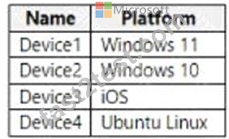
Which devices can be Azure AD joined, and which devices can be registered in contoso.com? To answer, select the appropriate options in the answer area. NOTE: Each correct selection is worth one point.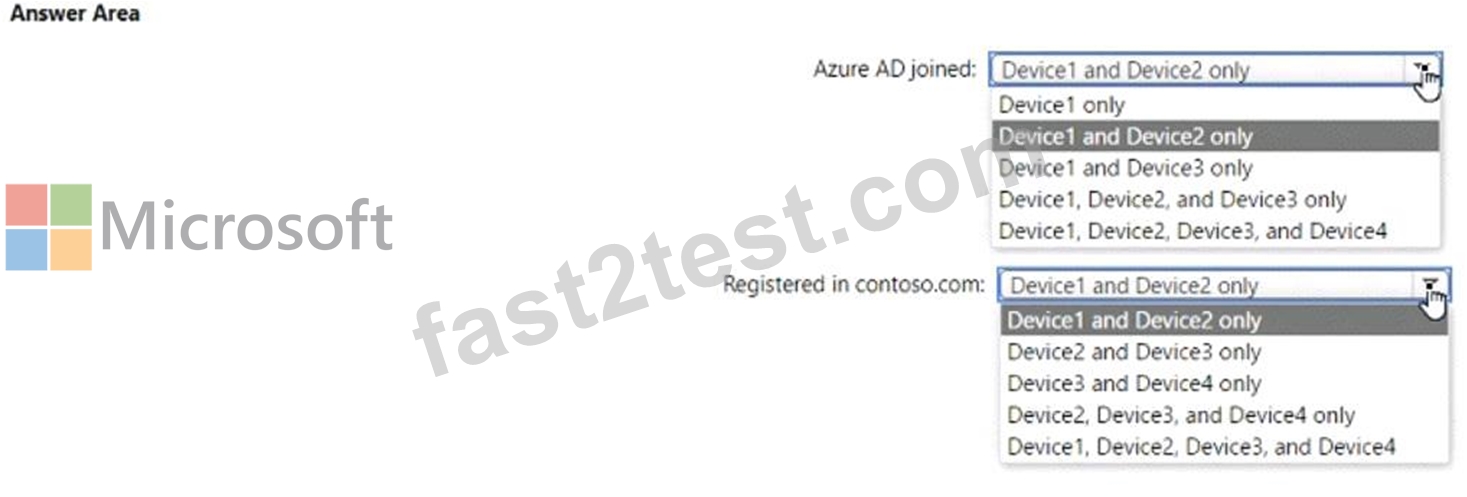
Answer:
Explanation: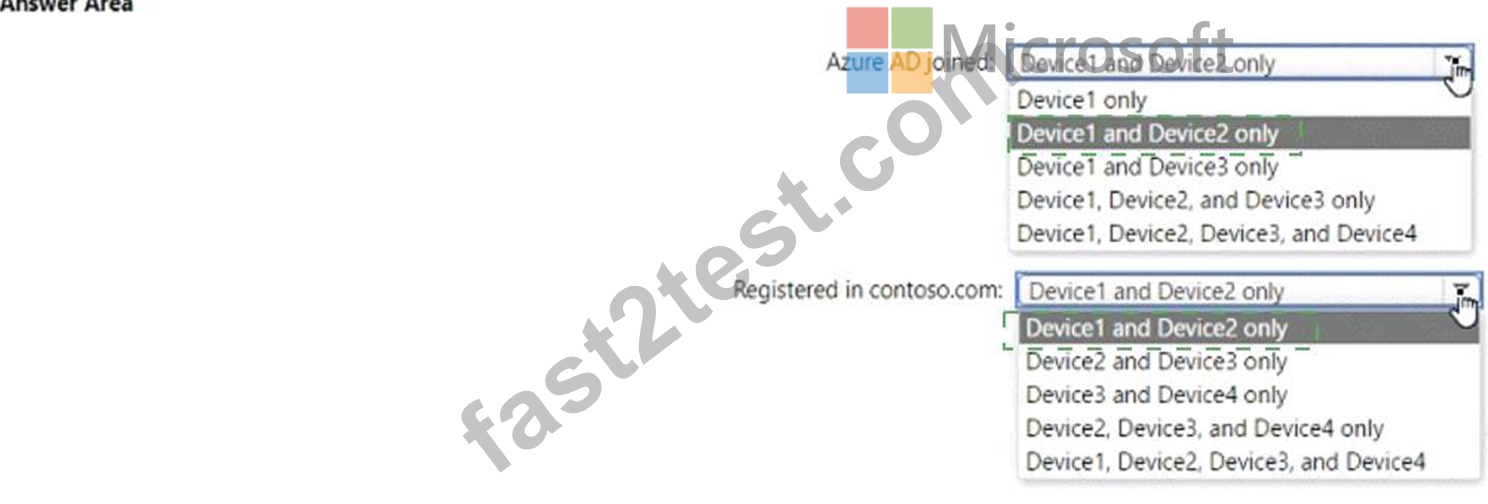
Explanation
NEW QUESTION # 70
Your company has a computer named Computer1 that runs Windows 10.
Computed was used by a user who left the company.
You plan to repurpose Computer1 and assign the computer to a new user.
You need to redeploy Computer1 by using Windows Autopilot.
Which three actions should you perform in sequence? To answer, move the appropriate actions from the list of actions to the answer area and arrange them in the correct order.
Answer:
Explanation:
Explanation: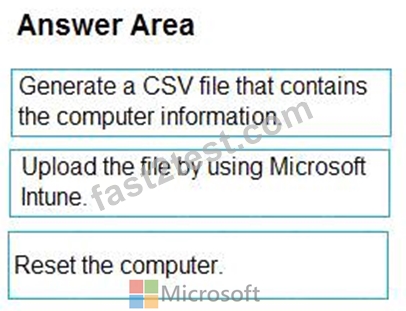
NEW QUESTION # 71
You have a workgroup computer named Client1 that runs Windows 11 and connects to a public network.
You need to enable PowerShell remoting on Client1. The solution must ensure that PowerShell remoting connections are accepted from the local subnet only.
Which PowerShell command should you run?
- A. Enable-PSRemoting -SkipNetworkProfileCheck
- B. Set-PSSessionConfiguration -AccessMode Local
- C. Set-NetFirewallRule -Name "WINRM-HTTP-In-TCP-PUBLIC" -RemoteAddress Any
- D. Enable-PSRemoting -Force
Answer: A
NEW QUESTION # 72
You have a Microsoft 365 E5 subscription.
You use Microsoft Intune to manage all devices.
You need to prepare a Win32 app named App1.exe for deployment.
What should you do first?
- A. From the Microsoft 365 Apps admin center, create a deployment configuration.
- B. Change App1.exe to the INTUNEWIN format.
- C. Upload App1.exe to Azure Blob Storage.
- D. From the Microsoft Intune admin center, create an app configuration policy.
Answer: B
NEW QUESTION # 73
You have a Microsoft 365 subscription that contains 500 Android Enterprise devices.
All the devices are enrolled in Microsoft Intune.
You need to deliver bookmarks to the Chrome browser on the devices
What should you create?
- A. an app configuration policy
- B. a compliance policy
- C. an app protection policy
- D. a configuration profile
Answer: C
NEW QUESTION # 74
You create a Windows Autopilot deployment profile.
You need to configure the profile settings to meet the following requirements:
Automatically enroll new devices and provision system apps without requiring end-user authentication.
Include the hardware serial number in the computer name.
Which two settings should you configure? To answer, select the appropriate settings in the answer area.
NOTE: Each correct selection is worth one point.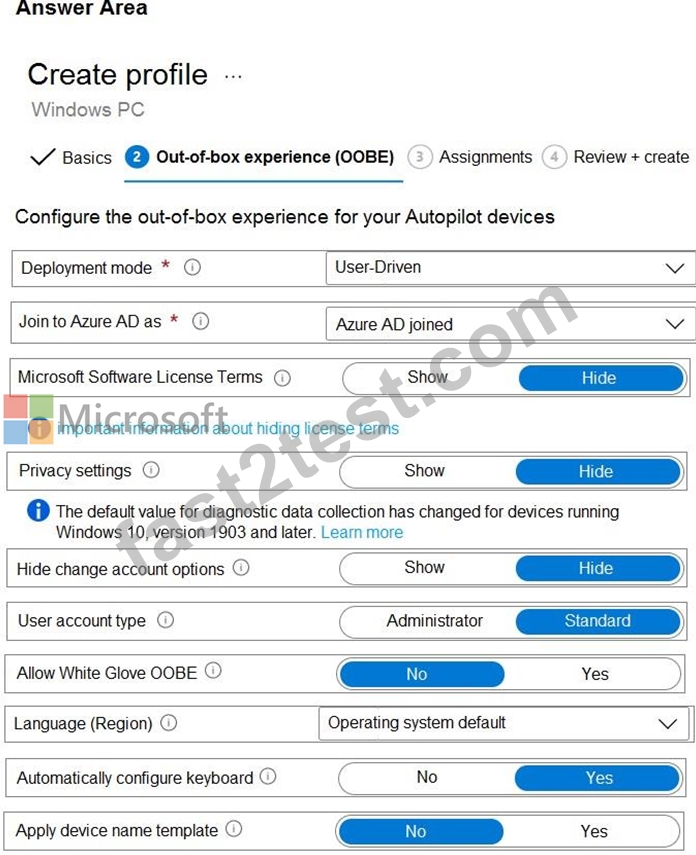
Answer:
Explanation: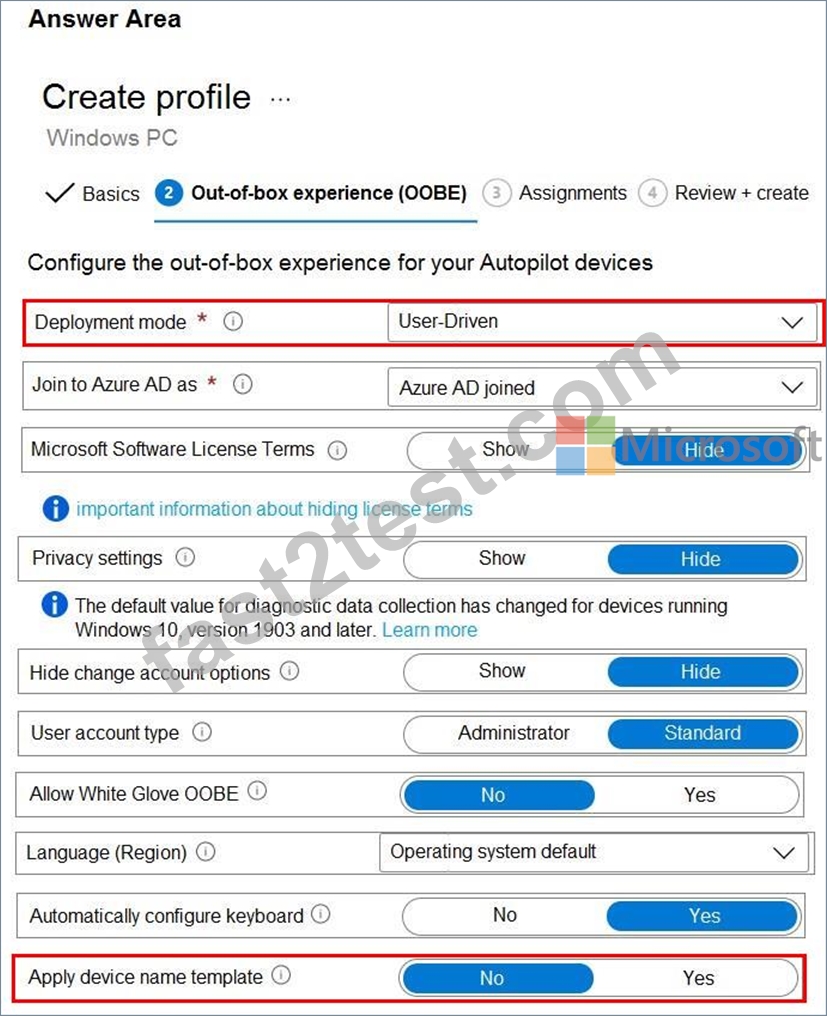
Reference:
https://docs.microsoft.com/en-us/mem/autopilot/profiles
NEW QUESTION # 75
You have an Azure AD tenant named contoso.com that contains the devices shown in the following table.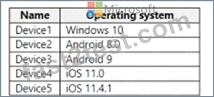
AH devices contain an app named App1 and are enrolled in Microsoft Intune.
You need to prevent users from copying data from App1 and pasting the data into other apps.
Which type of policy and how many policies should you create in Intune? To answer, select the appropriate options in the answer area.
NOTE: Each correct selection is worth one point.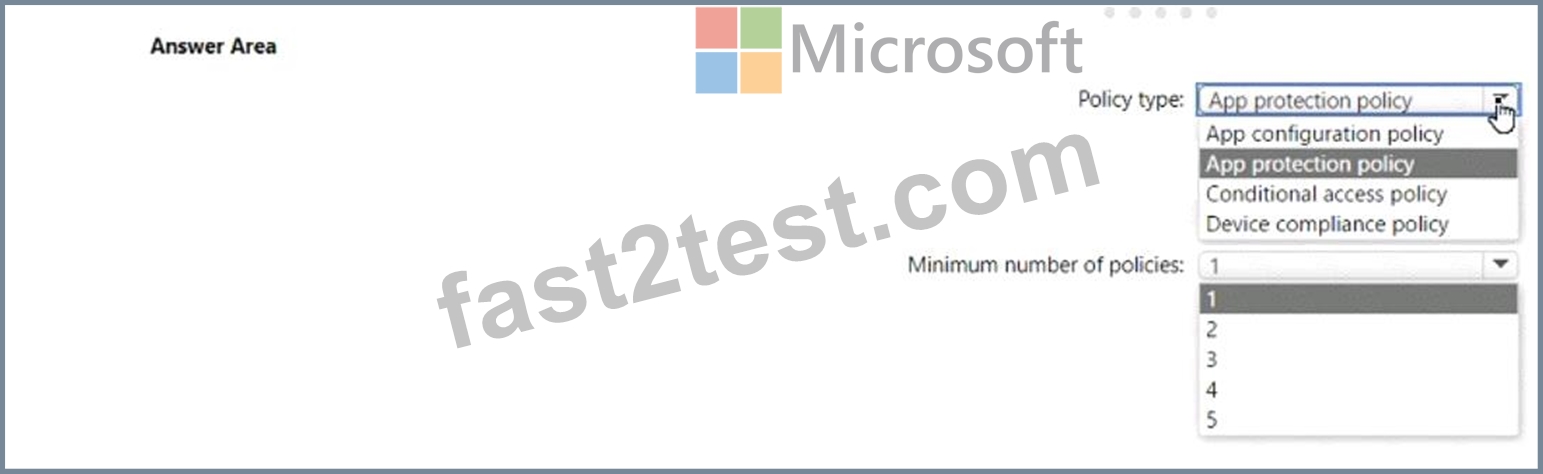
Answer:
Explanation: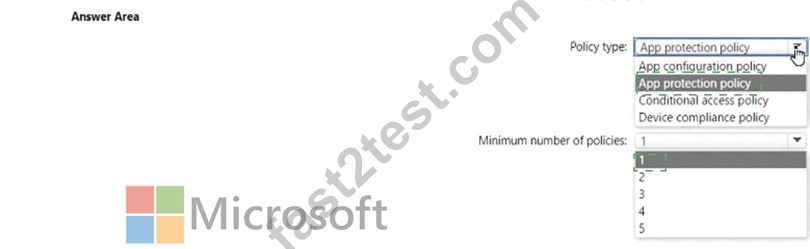
Explanation
Policy type: App protection policy Minimum number of policies: 1 Comprehensive Explanation of Correct Answer Only: The correct answer is app protection policy because it allows you to customize the settings of apps for iOS/iPadOS or Android devices1. One of the settings you can configure is Restrict cut, copy, and paste between other apps, which lets you prevent users from copying data from App1 and pasting the data into other apps2. You only need one policy to apply this setting to all devices that have App1 installed1.
References: 1: App configuration policies for Microsoft Intune | Microsoft Learn
https://learn.microsoft.com/en-us/mem/intune/apps/app-configuration-policies-overview 2: Troubleshoot restricting cut, copy, and paste between applications - Intune | Microsoft Learn
https://learn.microsoft.com/en-us/troubleshoot/mem/intune/app-protection-policies/troubleshoot-cut-copy-paste
NEW QUESTION # 76
You have a Microsoft 365 E5 subscription that contains 100 Windows 10 devices enrolled in Microsoft Intune.
You need to create Endpoint security policies to meet the following requirements:
Hide the Firewall & network protection area in the Windows Security app.
Disable the provisioning of Windows Hello for Business on the devices.
Which two policy types should you use? To answer, select the policies in the answer area.
NOTE: Each correct selection is worth one point.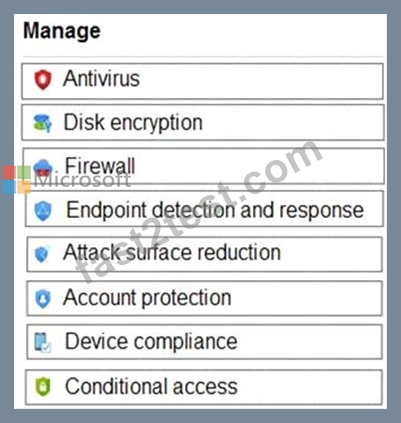
Answer:
Explanation: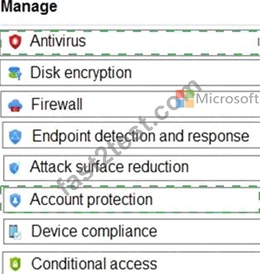
Explanation:
Graphical user interface, application Description automatically generated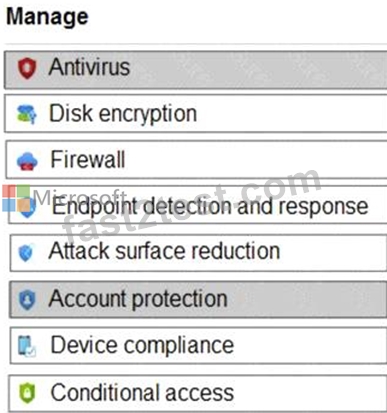
In the Antivirus policy settings, you can hide the Firewall and network protection area in the Windows Security app.
Windows Hello for Business settings are configured in Identity protection.
Reference:
https://docs.microsoft.com/en-us/mem/intune/protect/antivirus-security-experience-windows-settings
https://docs.microsoft.com/en-us/mem/intune/protect/identity-protection-windows-settings
NEW QUESTION # 77
Your company standardizes on Windows 10 Enterprise for all users.
Some users purchase their own computer from a retail store. The computers run Windows 10 Pro.
You need to recommend a solution to upgrade the computers to Windows 10 Enterprise, join the computers to Microsoft Azure Active Directory (Azure AD), and install several Microsoft Store apps. The solution must meet the following requirements:
- Ensure that any applications installed by the users are retained.
- Minimize user intervention.
What is the best recommendation to achieve the goal? More than one answer choice may achieve the goal. Select the BEST answer.
- A. a Windows Configuration Designer provisioning package
- B. Windows Deployment Services (WDS)
- C. Windows AutoPilot
- D. Microsoft Deployment ToolKit (MDT)
Answer: A
Explanation:
You use Windows Configuration Designer to create a provisioning package (.ppkg) that contains customization settings. You can apply the provisioning package to a device running Windows 10.
Incorrect Answers:
A: Microsoft Deployment Toolkit (MDT) allows you to automate the deployment of Windows operating systems in your organization. It is not used to upgrade to Windows 10 Enterprise.
B: Windows Deployment Services (WDS) is the revised version of Remote Installation Services (RIS).
WDS enables the deployment of Windows operating systems. You can use it to set up new computers using network-based installations. It is not used to upgrade to Windows 10 Enterprise.
D: Windows Autopilot is a user-driven mode designed to minimize intervention of the IT administrator.
https://docs.microsoft.com/en-us/windows/deployment/upgrade/windows-10-edition-upgrades
https://docs.microsoft.com/en-us/windows/configuration/provisioning-packages/provisioning- create-package
NEW QUESTION # 78
You have a Microsoft 365 subscription that contains the devices shown in the following table.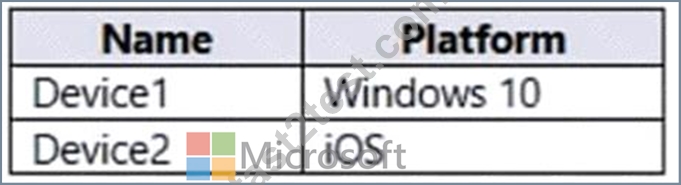
You plan to enroll the devices in Microsoft Intune.
How often will the compliance policy check-ins run after each device is enrolled in Intune? To answer, select the appropriate options in the answer area.
NOTE: Each correct selection is worth one point.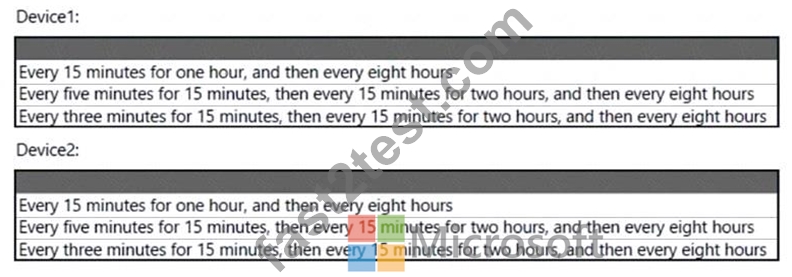
Answer:
Explanation: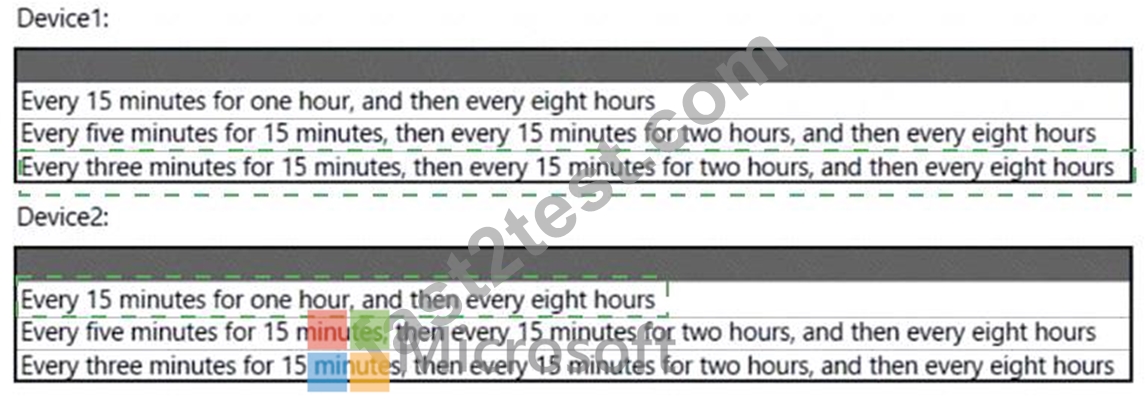
Explanation:
Box 1: Every three minutes for 15 minutes, then every 15 minutes for two hours, and then around every eight hours If devices recently enroll, then the compliance, non-compliance, and configuration check-in runs more frequently. The check-ins are estimated at:
Windows 10: Every 3 minutes for 15 minutes, then every 15 minutes for 2 hours, and then around every 8 hours Graphical user interface, text, application, email Description automatically generated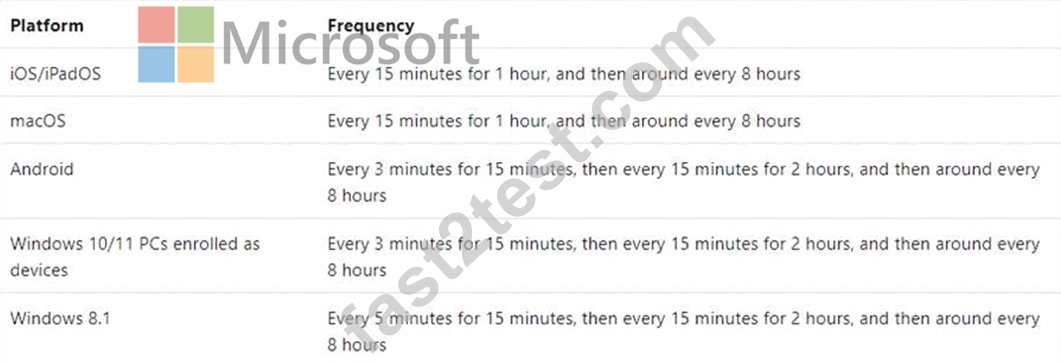
Box 2: Every 15 minutes for one hour, and then every eight hours
iOS/iPadOS: Every 15 minutes for 1 hour, and then around every 8 hours
Reference: https://docs.microsoft.com/en-us/mem/intune/configuration/device-profile-troubleshoot
NEW QUESTION # 79
You have a Microsoft 365 E5 subscription. The subscription contains devices that are Microsoft Entra joined and enrolled in Microsoft Intune.
You create a user named User1.
You need to ensure that User1 can rotate Bitlocker recovery keys by using Intune.
Solution: From the Microsoft Intune admin center, you assign the Endpoint Security Manager role to User1.
Does this meet the goal?
- A. No
- B. Yes
Answer: B
NEW QUESTION # 80
You need to recommend a solution to meet the device management requirements.
What should you include in the recommendation? To answer, select the appropriate options in the answer area.
NOTE: Each correct selection is worth one point.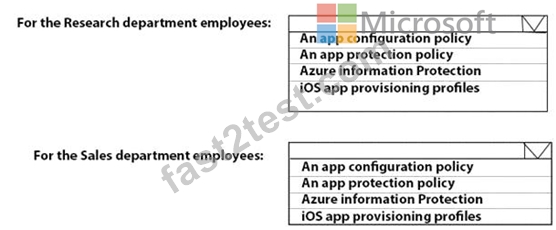
Answer:
Explanation: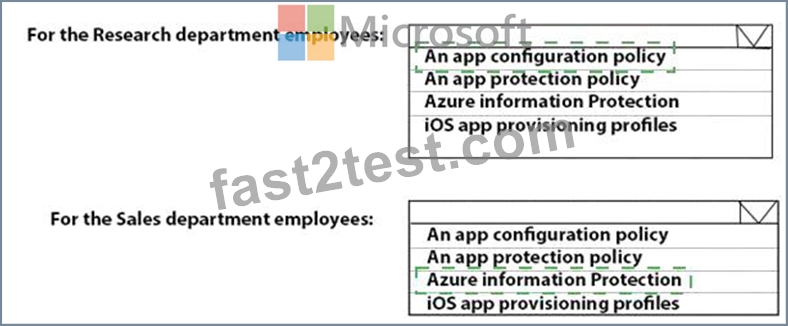
Explanation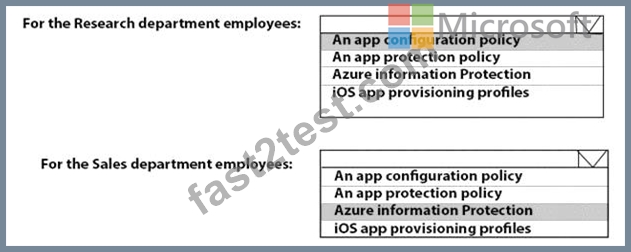
Reference:
https://github.com/MicrosoftDocs/IntuneDocs/blob/master/intune/app-protection-policy.md
https://docs.microsoft.com/en-us/azure/information-protection/configure-usage-rights#do-not-forward-option-for
NEW QUESTION # 81
You have a Microsoft 365 subscription that uses Microsoft Intune Suite.
You use Microsoft Intune to manage Windows 11 devices.
You need to implement passwordless authentication that requires users to use number matching.
Which authentication method should you use?
- A. FIDO2 security keys
- B. Microsoft Authenticator
- C. voice calls
- D. text messages
Answer: B
Explanation:
Microsoft Authenticator is a mobile app that provides a variety of authentication methods, including passwordless authentication. To use passwordless authentication with Microsoft Authenticator, users must first register their device and add their Azure AD account to the app.
Once registered, users can sign in to their Azure AD account by approving a notification on their device.
NEW QUESTION # 82
Drag and Drop Question
You have a Microsoft 365 E5 subscription that includes Microsoft Intune.
The subscription contains Android Enterprise devices that are enrolled in Intune and have personally-owned work profiles. All the Android devices are members of a group named Group1.
You need to ensure that end users and Intune administrators receive an email message when an Android device does NOT have an up-to-date security provider.
Which actions should you perform from the Microsoft Intune admin center in sequence? To answer, drag the appropriate actions to the correct order. Each action may be used once, more than once, or not at all. You may need to drag the split bar between panes or scroll to view content.
NOTE: Each correct selection is worth one point.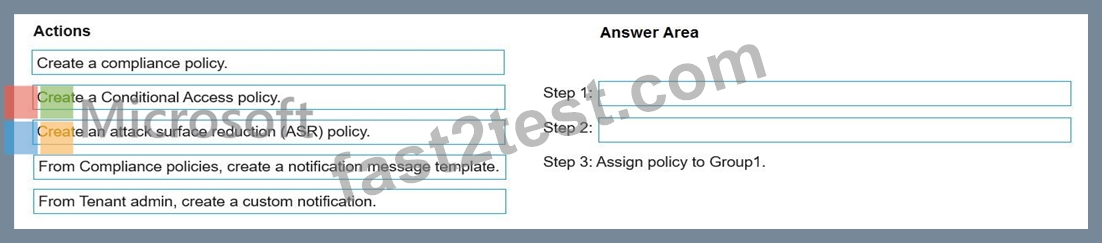
Answer:
Explanation: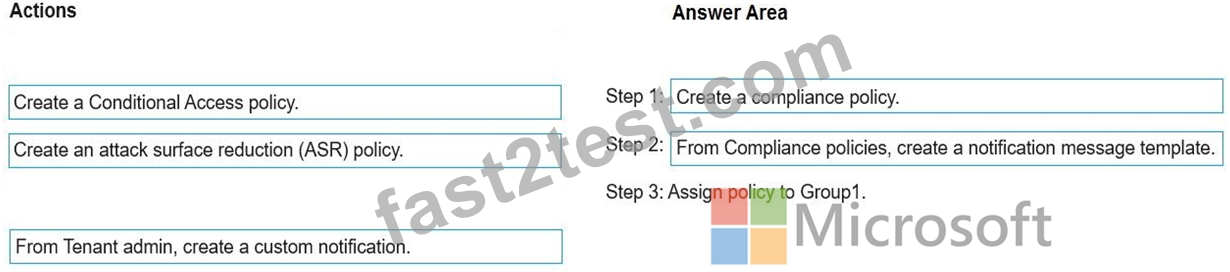
NEW QUESTION # 83
You have a Microsoft 365 subscription that uses Microsoft Intune Suite.
You use Microsoft Intune to manage devices.
You have a Windows 11 device named Device1 that is enrolled in Intune. Device1 has been offline for 30 days.
You need to remove Device1 from Intune immediately. The solution must ensure that if the device checks in again, any apps and data provisioned by Intune are removed. User-installed apps, personal data, and OEM-installed apps must be retained.
What should you use?
- A. a Retire action
- B. a Delete action
- C. a Fresh Start action
- D. an Autopilot Reset action
Answer: B
Explanation:
The clue in this question is: You need to remove Device1 from Intune immediately So basically the only option that is left is 'delete' as this instantly removes the device from intune and only removes company data.
https://learn.microsoft.com/en-us/mem/intune/remote-actions/devices-wipe#delete-devices-from- the-intune-admin-center
NEW QUESTION # 84
You have computers that run Windows 10 and are configured by using Windows AutoPilot.
A user performs the following tasks on a computer named Computer1:
* Creates a VPN connection to the corporate network
* Installs a Microsoft Store app named App1
* Connects to a Wi-Fi network
You perform a Windows AutoPilot Reset on Computer1.
What will be the state of the computer when the user signs in? To answer, select the appropriate options in the answer area.
NOTE:Each correct selection is worth one point.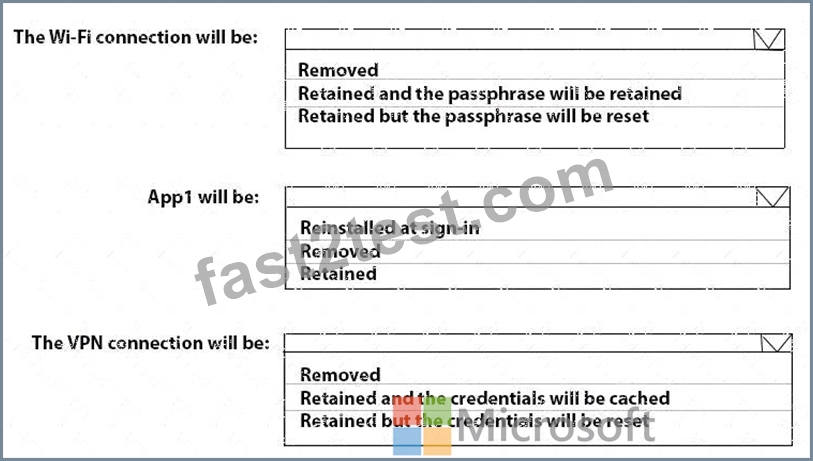
Answer:
Explanation: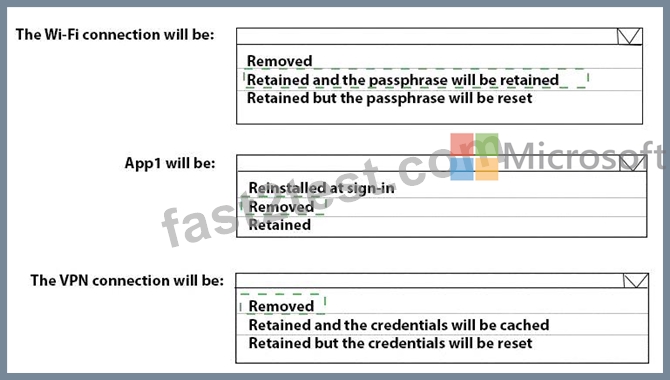
Explanation: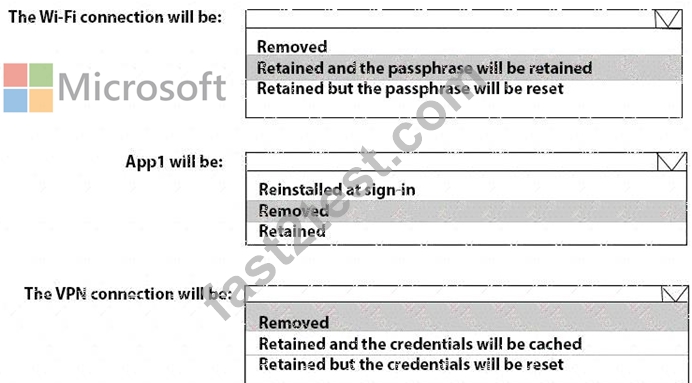
Reference:
https://docs.microsoft.com/en-us/windows/deployment/windows-autopilot/windows-autopilot-reset
NEW QUESTION # 85
You have a Microsoft 365 tenant that contains the Windows 10 devices shown in the following table.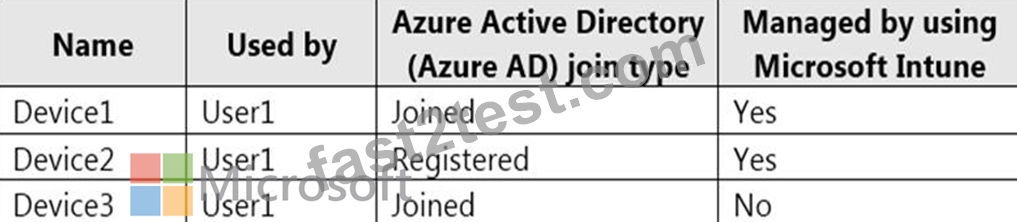
You enable Enterprise State Roaming.
You need to ensure that User1 can sync Windows settings across the devices.
What should you do?
- A. Remove Device1 and Device2 from Intune.
- B. Join Device2 to Azure AD.
- C. Enroll Device3 in Intune.
- D. Add a Microsoft account to each device.
Answer: B
Explanation:
For a Windows 10 or newer device to use the Enterprise State Roaming service, the device must authenticate using an Azure AD identity. For devices that are joined to Azure AD, the user's primary sign-in identity is their Azure AD identity, so no other configuration is required.
Reference:
https://docs.microsoft.com/en-us/azure/active-directory/devices/enterprise-state-roaming-enable
NEW QUESTION # 86
You have a Microsoft 365 E5 subscription. All devices are enrolled in Microsoft Intune.
You have a device group named Group1 that contains five Windows 11 devices.
You need to ensure that the devices in Group1 automatically receive new Windows 11 builds before the builds are released to the public.
What should you configure in Intune? To answer, select the appropriate options in the answer area.
NOTE: Each correct selection is worth one point.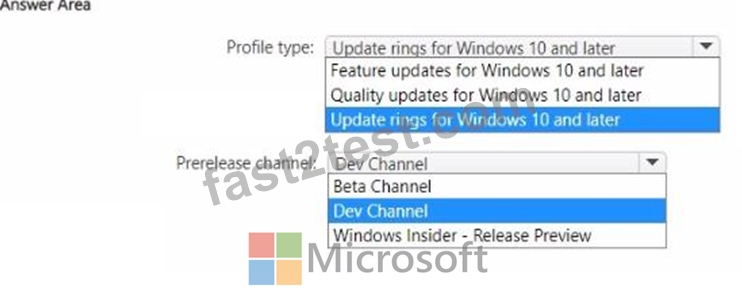
Answer:
Explanation: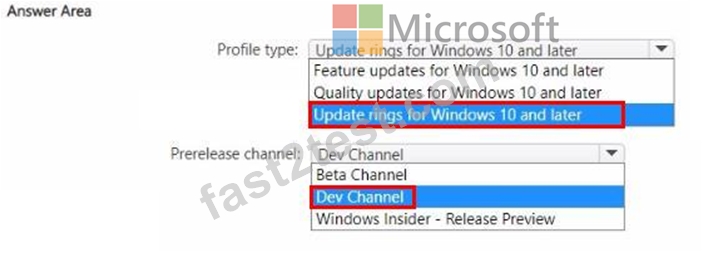
NEW QUESTION # 87
Hotspot Question
You have an Azure AD tenant that contains the users shown in the following table.
You have the devices shown in the following table.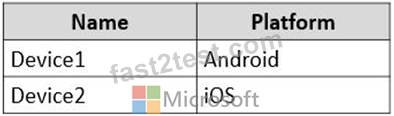
You have a Conditional Access policy named CAPolicy1 that has the following settings:
- Assignments
o Users or workload identities: User1, User2
o Cloud apps or actions: Office 365 Exchange Online
o Conditions: Device platforms: Windows, iOS
- Access controls
o Grant: Require multi-factor authentication
You have a Conditional Access policy named CAPolicy2 that has the following settings:
- Assignments
o Users or workload identities: User1, User2
o Cloud apps or actions: Office 365 Exchange Online
o Conditions
Device platforms: Android, iOS
Filter for devices
Device matching the rule: Exclude filtered devices from policy
Rule syntax: device.displayName - contains "1"
Access controls
Grant: Block access
For each of the following statements, select Yes if the statement is true. Otherwise, select No.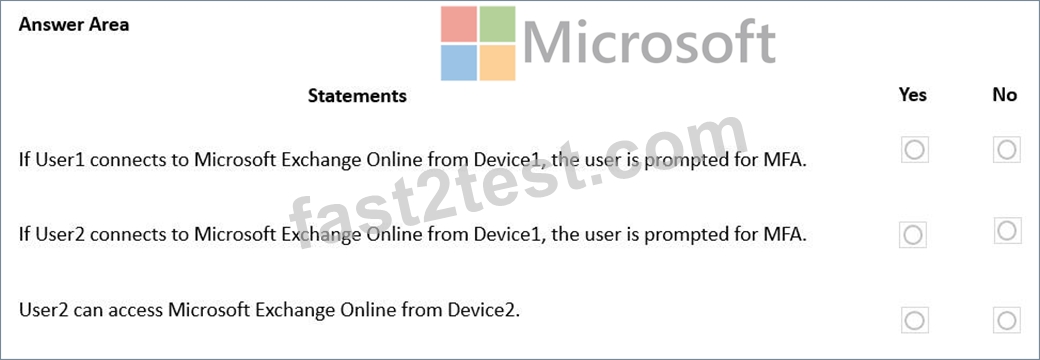
Answer:
Explanation: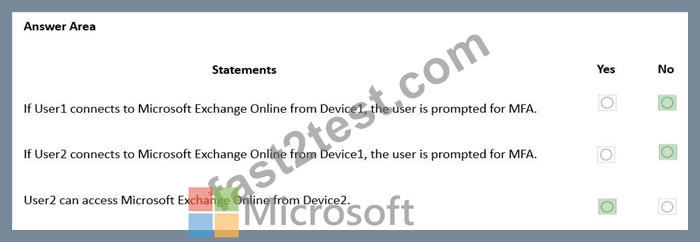
NEW QUESTION # 88
......
Microsoft MD-102 Exam Syllabus Topics:
| Topic | Details |
|---|---|
| Topic 1 |
|
| Topic 2 |
|
| Topic 3 |
|
| Topic 4 |
|
Latest 100% Passing Guarantee - Brilliant MD-102 Exam Questions PDF: https://www.fast2test.com/MD-102-premium-file.html
Practice Examples and Dumps & Tips for 2025 Latest MD-102 Valid Tests Dumps: https://drive.google.com/open?id=1wpog24otU7NRywJecWADMWSMCvYXm-WF