
Microsoft Programming in HTML5 with JavaScript and CSS3 (070-480日本語版) - 070-480日本語 Exam Practice Test


Correct Answer:

Explanation

* What is the difference between call and apply?
apply lets you invoke the function with arguments as an array; call requires the parameters be listed explicitly.
Pseudo syntax:
theFunction.apply(valueForThis, arrayOfArgs)
theFunction.call(valueForThis, arg1, arg2, ...)
Reference: What is the difference between call and apply?


Correct Answer: D
Vote an answer
Explanation: Only visible for Fast2test members. You can sign-up / login (it's free).


Correct Answer:

Explanation

* getElementById
The getElementById() method accesses the first element with the specified id. We use it to get a reference to the canvas.
* context.fillStyle.
Example:
Define a red fill-color for the rectangle:
JavaScript:
var c=document.getElementById("myCanvas");
var ctx=c.getContext("2d");
ctx.fillStyle="#FF0000";
ctx.fillRect(20,20,150,100);
Reference: HTML canvas fillStyle Property

function Employee() {}
Employee.prototype.PayEmployee = function ( ){
alertt'Hi there!');
}

Correct Answer: A,C
Vote an answer
Explanation: Only visible for Fast2test members. You can sign-up / login (it's free).


Correct Answer:

Explanation

* a img
All elements that are descendants of an element.
* (this).parent
This is the element and is the parent.


Correct Answer: A,D
Vote an answer
Explanation: Only visible for Fast2test members. You can sign-up / login (it's free).

<div>
Logo:<br>
<div id="logo">
</div>
</div>

Correct Answer: B,D
Vote an answer
Explanation: Only visible for Fast2test members. You can sign-up / login (it's free).

Correct Answer: B
Vote an answer
Explanation: Only visible for Fast2test members. You can sign-up / login (it's free).


Correct Answer: C
Vote an answer
Explanation: Only visible for Fast2test members. You can sign-up / login (it's free).


<a href="help.html">Help</a>


Correct Answer:

Explanation

var para = document.createElement("a");
var attr = document.createAttribute("href");
attr.value = "help.html";
para.setAttributeNode(attr);
var node = document.createTextNode("Help");
para.appendChild(node);
var element = document.getElementById("navlist");
element.appendChild(para);


Correct Answer:

Explanation

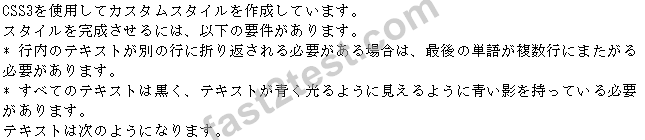
* text-shadow
* hyphens: auto
Words can be broken at appropriate hyphenation points either as determined by hyphenation characters) inside the word or as determined automatically by a language-appropriate hyphenation resource (if supported by the browser or provided via @hyphenation-resource).
Conditional hyphenation characters inside a word, if present, take priority over automatic resources when determining hyphenation points within the word.
Reference: CSS3 text-shadow Property; hyphens | CSS-Tricks


Correct Answer:

Explanation
Box 1: var img = document.createElement('img');
Box 2: img:alt = image.Description;
img src = image.FileName;
Box 3: return this.img;
Note:
* Image Object
The Image object represents an embedded image.
For each <img> tag in an HTML document, an Image object is created.
Notice that images are not technically inserted into an HTML page, images are linked to HTML pages. The
<img> tag creates a holding space for the referenced image.
* Image Object Properties include
alt, Sets or returns the value of the alt attribute of an image
src, Sets or returns the value of the src attribute of an image


Correct Answer:

Explanation
Box 1:

Box 2:

Box 3:

Box 4:

Note:

* Here there is a basic example:
// our constructor
function Person(name, age){
this.name = name;
this.age = age;
};
// prototype assignment
Person.prototype = (function(){
// we have a scope for private stuff
// created once and not for every instance
function toString(){
return this.name + " is " + this.age;
};
// create the prototype and return them
return {
// never forget the constructor ...
constructor:Person,
// "magic" toString method
toString:function(){
// call private toString method
return toString.call(this);
}
};
})();
* Example:
You can simulate private methods like this:
function Restaurant() {
}
Restaurant.prototype = (function() {
var private_stuff = function() {
// Private code here
};
return {
constructor:Restaurant,
use_restroom:function() {
private_stuff();
}
};
})();
var r = new Restaurant();
// This will work:
r.use_restroom();
// This will cause an error:
r.private_stuff();


Correct Answer: D
Vote an answer
Explanation: Only visible for Fast2test members. You can sign-up / login (it's free).