

Salesforce Developers JS-Dev-101 Dumps Full Questions with Free PDF Questions to Pass
100% Updated Salesforce JS-Dev-101 Enterprise PDF Dumps
Salesforce JS-Dev-101 Exam Syllabus Topics:
| Topic | Details |
|---|---|
| Topic 1 |
|
| Topic 2 |
|
| Topic 3 |
|
| Topic 4 |
|
NEW QUESTION # 31
Refer to the following code:
<html lang="en">
<body>
<button class="secondary">Save draft</button>
<button class="primary">Save and close</button>
</body>
<script>
function displaySaveMessage(event) {
console.log('Save message.');
}
function displaySuccessMessage(event) {
console.log('Success message.');
}
window.onload = function() {
document.querySelector('.secondary')
.addEventListener('click', displaySaveMessage, true);
document.querySelector('.primary')
.addEventListener('click', displaySuccessMessage, true);
}
</script>
</html>
- A. > Inner message
- B. > Outer message
Inner message - C. > Inner message
Outer message - D. > Outer message
Answer: B
Explanation:
The answer choices appear to belong to an event propagation question using nested elements such as an outer element and an inner element.
The important clue is this third argument:
addEventListener('click', handlerFunction, true);
When the third argument is true, the event listener runs during the capturing phase.
In event capturing, the browser handles the event from the outside toward the inside:
Outer element → Inner element
So, if an inner element is clicked and both the outer and inner elements have click listeners registered with capture mode set to true, the outer listener runs first, then the inner listener runs.
That produces:
Outer message
Inner message
So the matching option is B.
Important correction:
In the exact code shown, the buttons are sibling elements:
<button class="secondary">Save draft</button>
<button class="primary">Save and close</button>
They are not nested inside one another. Therefore, with the code exactly as written:
Clicking the secondary button logs:
Save message.
Clicking the primary button logs:
Success message.
However, because the provided answer choices refer to Outer message and Inner message, the intended concept is clearly event capturing. In a capturing-phase question with nested outer and inner elements, the correct order is:
Outer message
Inner message
Therefore, the verified answer for the intended event-capturing question is B.
NEW QUESTION # 32
Refer to the following object:
01 const cat = {
02 firstName: 'Fancy',
03 lastName: 'Whiskers',
04 get fullName(){
05 return this.firstName + ' ' + this.lastName;
06 }
07 };
How can a developer access the fullName property for cat?
- A. cat.fullName()
- B. cat.function.fullName()
- C. cat.get.fullName
- D. cat.fullName
Answer: D
Explanation:
fullName is defined as a getter:
get fullName() { ... }
Getters are accessed like properties, not like functions.
So:
cat.fullName; // "Fancy Whiskers"
No parentheses.
Why others are wrong:
A: cat.fullName() tries to call the returned string as a function.
B and C: These properties (get, function) do not exist; they are misinterpretations of syntax.
NEW QUESTION # 33
Refer to the code:
01 function execute() {
02 return new Promise((resolve, reject) => reject());
03 }
04 let promise = execute();
05
06 promise
07 .then(() => console.log('Resolved1'))
08 .then(() => console.log('Resolved2'))
09 .then(() => console.log('Resolved3'))
10 .catch(() => console.log('Rejected'))
11 .then(() => console.log('Resolved4'));
What is the result when the Promise in the execute function is rejected?
- A. Rejected
- B. Resolved1 Resolved2 Resolved3 Resolved4
- C. Rejected Resolved4
- D. Resolved1 Resolved2 Resolved3 Rejected Resolved4
Answer: C
Explanation:
Comprehensive and Detailed Explanation From Exact Extract JavaScript Knowledge:
execute() returns a Promise that immediately calls reject().
So promise starts in a rejected state.
When a Promise is rejected and you chain .then() calls without rejection handlers, all those .then() callbacks are skipped until a .catch() is encountered:
promise
.then(...) // skipped
.then(...) // skipped
.then(...) // skipped
.catch(...) // executed
.then(...); // executed after catch
Execution:
.then(() => console.log('Resolved1')) is skipped.
.then(() => console.log('Resolved2')) is skipped.
.then(() => console.log('Resolved3')) is skipped.
.catch(() => console.log('Rejected')) runs and logs Rejected.
The .catch() returns a resolved Promise (no explicit return, so undefined), so the next .then() runs:
.then(() => console.log('Resolved4')) logs Resolved4.
Final output:
Rejected
Resolved4
This matches option D.
________________________________________
NEW QUESTION # 34
Given the following code:
let x = null;
console.log(typeof x);
What is the output?
- A. "x"
- B. "undefined"
- C. "null"
- D. "object"
Answer: D
NEW QUESTION # 35
Which statement allows a developer to update the browser navigation history without a page refresh?
- A. window.history.pushState(newStateObject, '', null);
- B. window.history.createState(newStateObject, '');
- C. window.customHistory.pushState(newStateObject, '', null);
- D. window.history.updateState(newStateObject, '');
Answer: A
Explanation:
The correct answer is C.
The browser provides the History API through:
window.history
To add a new entry to the browser's session history without refreshing the page, JavaScript uses:
window.history.pushState(state, title, url);
So the valid statement is:
window.history.pushState(newStateObject, '', null);
This updates the browser history stack without forcing a full page reload. It is commonly used in single-page applications when changing views or routes dynamically.
The method accepts three arguments:
window.history.pushState(stateObject, title, url);
stateObject stores custom data associated with the history entry.
title is usually passed as an empty string because many browsers ignore it.
url optionally changes the displayed URL. Passing null means no new URL is provided.
Option A is incorrect because:
window.customHistory
is not the standard browser History API object.
Option B is incorrect because:
createState()
is not a valid History API method.
Option D is incorrect because:
updateState()
is not a valid History API method.
The correct browser API method is:
window.history.pushState()
Therefore, the verified answer is C.
NEW QUESTION # 36
Refer to the following object.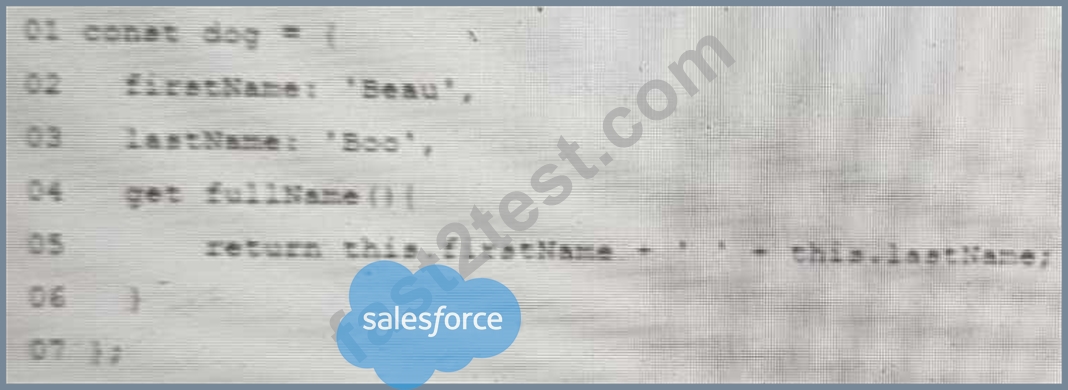
How can a developer access the fullName property for dog?
- A. Dog, function, fullName
- B. Dog.fullName
- C. Dog, get,fullName
- D. Dog.fullName ( )
Answer: B
NEW QUESTION # 37
Refer to the followingcode: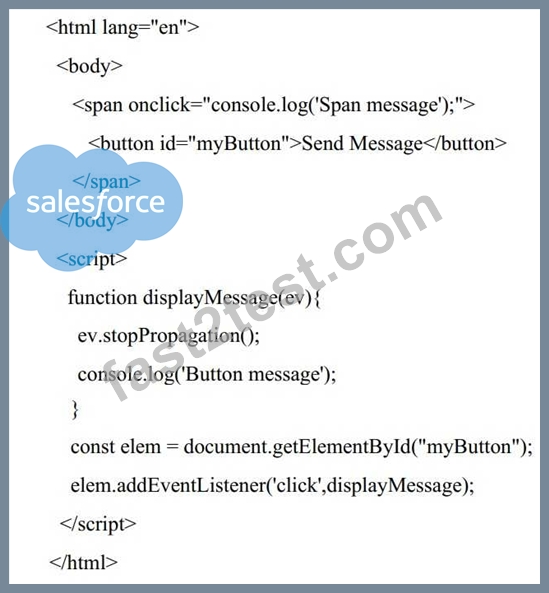
- A. Option C
- B. Option D
- C. Option A
- D. Option B
Answer: C
NEW QUESTION # 38
A developer publishes a new version of a package with bug fixes but no breaking changes. The old version number was 2.1.1.
What should the new package version number be based on semantic versioning?
- A. 2.2.1
- B. 3.1.1
- C. 2.1.2
- D. 2.2.0
Answer: C
Explanation:
Semantic versioning: MAJOR.MINOR.PATCH
MAJOR: incompatible API changes.
MINOR: add functionality in a backward compatible manner.
PATCH: backward compatible bug fixes.
Here:
Bug fixes only, no breaking changes → increment PATCH.
From 2.1.1 to 2.1.2.
So the correct new version is 2.1.2.
NEW QUESTION # 39
Refer to the code below:
let o = {
get js() {
let city1 = String("st. Louis");
let city2 = String(" New York");
return {
firstCity: city1.toLowerCase(),
secondCity: city2.toLowerCase(),
}
}
}
What value can a developer expect when referencing o.js.secondCity?
- A. ' new york '
- B. Undefined
- C. ' New York '
- D. An error
Answer: A
NEW QUESTION # 40
A developer is trying to convince management that their team will benefit from using Node.js for a backend server that they are going to create. The server will be a web server that handles API requests from a website that the team has already built using HTML, CSS, and JavaScript.
Which three benefits of Node.js can the developer use to persuade their manager?
- A. Uses non-blocking functionality for performant request handling.
- B. Ensures stability with one major release every few years.
- C. Installs with its own package manager to install and manage third-party libraries.
- D. Executes server-side JavaScript code to avoid learning a new language.
- E. Performs a static analysis on code before execution to look for runtime errors.
Answer: A,C,D
Explanation:
The correct answers are A, C, and E.
Node.js allows JavaScript to run outside the browser. That makes it useful for backend development, command-line tools, APIs, real-time applications, and server-side services.
A is correct because Node.js executes JavaScript on the server side.
A team that already knows:
HTML
CSS
JavaScript
can use JavaScript for backend development as well. This reduces the need to switch to a completely different backend language.
Example:
const http = require('http');
const server = http.createServer((req, res) => {
res.end('Hello from Node.js');
});
server.listen(3000);
This is server-side JavaScript.
C is correct because Node.js uses a non-blocking, event-driven model.
For API servers, this is valuable because Node.js can handle many I/O operations without blocking the entire process while waiting for tasks like:
database queries
file reads
network requests
API responses
Instead of waiting synchronously, Node.js can register callbacks, promises, or async functions and continue handling other work.
E is correct because Node.js commonly installs with npm, the Node Package Manager.
npm is used to install and manage third-party libraries, such as:
Express
Socket.IO
dotenv
Jest
Axios
This makes it easier to build backend applications using reusable packages.
Now review the incorrect answers:
B is incorrect because JavaScript is not primarily a static-analysis language by default. Node.js executes JavaScript at runtime. Static checking can be added with tools such as TypeScript, ESLint, or other analyzers, but that is not an inherent Node.js benefit.
D is incorrect because Node.js does not release one major version only every few years. Its release cycle is more frequent than that, so this is not an accurate benefit statement.
Therefore, the verified answers are A, C, and E.
NEW QUESTION # 41
A developer has an ErrorHandler module that contains multiple functions.
What kind of export should be leveraged so that multiple functions can be used?
- A. multi
- B. named
- C. all
- D. default
Answer: B
NEW QUESTION # 42
Whichthree actions can be using the JavaScript browser console?
Choose 3 answers:
- A. Run code that is not related to page.
- B. view , change, and debug the JavaScript code ofthe page.
- C. View and change DOM the page.
- D. Display a report showing the performance of a page.
- E. View and change security cookies.
Answer: A,B,C
NEW QUESTION # 43
A developer wants to iterate through an array of objects and count the objects and count the objects whose property value, name, starts with the letterN.
Const arrObj = [{"name" : "Zach"} , {"name" : "Kate"},{"name" : "Alise"},{"name" : "Bob"},{"name" :
"Natham"},{"name" : "nathaniel"}
Refer to the code snippet below:
01 arrObj.reduce(( acc, curr) => {
02 //missing line 02
02 //missing line 03
04 ). 0);
Which missing lines 02 and 03 return the correct count?
- A. Const sum = curr.name.startsWith('N') ? 1: 0;Return acc +sum
- B. Const sum = curr.startsWIth('N') ? 1: 0;Return curr+ sum
- C. Const sum =curr.name.startsWIth('N') ? 1: 0;Return curr+ sum
- D. Const sum = curr.startsWith('N') ? 1: 0;Return acc +sum
Answer: A
NEW QUESTION # 44
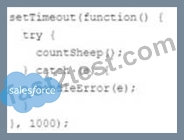
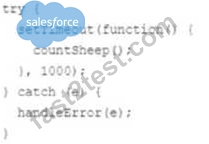
A developer wants to use a try...catch statement to catch any error that countSheep () may throw and pass it to a handleError () function.
What is the correct implementation of the try...catch?
- A.
- B.
Answer: B
NEW QUESTION # 45
A class was written to represent regular items and sale items. Code:
01 let regItem = new Item('Scarf', 55);
02 let saleItem = new SaleItem('Shirt', 80, .1);
03 Item.prototype.description = function() { return 'This is a ' + this.name; }
04 console.log(regItem.description());
05 console.log(saleItem.description());
06
07 SaleItem.prototype.description = function() { return 'This is a discounted ' + this.name; }
08 console.log(regItem.description());
09 console.log(saleItem.description());
What is the output?
- A. This is a Scarf
Uncaught TypeError: saleItem.description is not a function
This is a Shirt
This is a discounted Shirt - B. This is a Scarf
Uncaught TypeError: saleItem.description is not a function
This is a Scarf
This is a discounted Shirt - C. This is a Scarf
This is a Shirt
This is a Scarf
This is a discounted Shirt - D. This is a Scarf
This is a Shirt
This is a discounted Scarf
This is a discounted Shirt
Answer: C
Explanation:
At line 03, the developer assigns:
Item.prototype.description = function() { return 'This is a ' + this.name; } This affects all objects whose prototype chain includes Item.prototype.
regItem inherits from Item → gets this method.
saleItem, as an instance of SaleItem, also inherits Item.prototype (since SaleItem uses prototype inheritance from Item), so it also has this method at this moment.
Outputs at lines 04 and 05:
regItem.description() → "This is a Scarf"
saleItem.description() → "This is a Shirt"
At line 07, the developer overrides the method on SaleItem.prototype:
SaleItem.prototype.description = function() {
return 'This is a discounted ' + this.name;
}
From this point:
regItem still uses the Item.prototype version
saleItem uses the overridden SaleItem.prototype version
Outputs at lines 08 and 09:
regItem.description() → "This is a Scarf"
saleItem.description() → "This is a discounted Shirt"
Combining all results:
This is a Scarf
This is a Shirt
This is a Scarf
This is a discounted Shirt
This matches option B.
JavaScript Knowledge Reference (text-only)
Objects created from constructor functions use prototype chaining.
Overriding a subclass prototype method does not affect the parent class prototype.
Instances inherit the most specific version of the method on their prototype chain.
NEW QUESTION # 46
Refer to the following code:
```html
<html lang="en">
<body>
<button class="secondary">Save draft</button>
<button class="primary">Save and close</button>
</body>
<script>
function displaySaveMessage(event) {
console.log('Save message.');
}
function displaySuccessMessage(event) {
console.log('Success message.');
}
window.onload = function() {
document.querySelector('.secondary')
.addEventListener('click', displaySaveMessage, true);
document.querySelector('.primary')
.addEventListener('click', displaySuccessMessage, true);
}
</script>
</html>
- A. >Inner message
Outer message - B. >Inner message
- C. >Outer message
- D. >Outer message
Inner message
Answer: D
NEW QUESTION # 47
A team at Universal Containers works on a big project and uses yarn to manage the project's dependencies.
A developer added a dependency to manipulate dates and pushed the updates to the remote repository. The rest of the team complains that the dependency does not get downloaded when they execute yarn.
What could be the reason for this?
- A. The developer missed the option --save when adding the dependency.
- B. The developer added the dependency as a dev dependency, and YARN_ENV is set to production.
- C. The developer added the dependency as a dev dependency, and NODE_ENV is set to production.
- D. The developer missed the option --add when adding the dependency.
Answer: C
Explanation:
In JavaScript server-side development using Node.js, dependency management is typically handled through package managers such as npm or yarn. These tools categorize installed packages into:
dependencies - required for running the application in any environment
devDependencies - required only during development (testing tools, build tools, documentation generators, etc.) When a package is installed using:
yarn add <package> --dev
it is placed under the "devDependencies" section of package.json.
Behavior of Production Mode
Node.js uses the environment variable:
NODE_ENV=production
When this environment variable is set to production, both npm and Yarn follow the standard Node.js convention and skip installing devDependencies. This is done to optimize production builds and reduce deployment size. This is a known and documented behavior in Node.js package management tools.
Therefore, if:
The developer added the date-manipulation library as a dev dependency, and Other team members execute yarn in an environment where NODE_ENV=production is set, then Yarn will not install that dependency because devDependencies are intentionally excluded in production mode.
This explains the behavior described in the question.
Why the Other Options Are Incorrect
Option A:
"YARN_ENV is set to production" is incorrect because Yarn does not use the variable YARN_ENV for dependency installation behavior. Node.js tools use NODE_ENV, not YARN_ENV.
Option B:
This is incorrect because Yarn automatically writes dependencies into package.json. Unlike older npm versions, there is no need for the --save flag.
Option D:
There is no such option as --add. The correct syntax is simply:
yarn add <package>
Missing an option that does not exist cannot be the cause.
JavaScript Knowledge Reference
Node.js uses the environment variable NODE_ENV to determine production or development mode.
Package managers (npm and Yarn) follow the rule that when NODE_ENV=production, only "dependencies" are installed and "devDependencies" are skipped.
Yarn automatically persists installed packages to package.json without requiring --save.
Yarn uses the command yarn add to add dependencies; there is no --add flag.
NEW QUESTION # 48
Refer to the code snippet:
01 function getAvailableilityMessage(item) {
02 if (getAvailableility(item)) {
03 var msg = "Username available";
04 }
05 return msg;
06 }
What is the return value of msg when getAvailableilityMessage("newUserName") is executed and getAvailableility("newUserName") returns false?
- A. "Username available"
- B. undefined
- C. "msg is not defined"
- D. "newUserName"
Answer: B
Explanation:
Key details:
var has function scope, not block scope.
Declaration var msg is hoisted to the top of the function, but initialization only happens if the if condition is true.
Effectively, the function behaves like:
function getAvailableilityMessage(item) {
var msg; // hoisted declaration
if (getAvailableility(item)) {
msg = "Username available";
}
return msg;
}
Now, given:
getAvailableility("newUserName") returns false.
Execution:
The if condition is false, so the body does not execute.
Therefore msg is declared but never assigned.
In JavaScript, an uninitialized variable that has been declared with var has the value undefined.
Thus:
return msg; // returns undefined
Why other options are wrong:
A: "newUserName" - msg never receives the parameter value; it's only set to "Username available" inside the if, which does not run.
B: "msg is not defined" - That kind of error occurs if msg were never declared. Here it is declared via var, so it is defined but undefined.
D: "Username available" - This would require the if branch to run, which it does not when getAvailableility(...) is false.
So the return value is:
undefined
Study Guide Concepts:
var hoisting and function scope
Uninitialized variables default to undefined
Control flow and conditional initialization
NEW QUESTION # 49
A developer has the function, shown below, that is called when a page loads.
function onload() {
console.log("Page has loaded!");
}
Where can the developer see the log statement after loading the page in the browser?
- A. Terminal running the web server.
- B. Browser performance toots
- C. On the webpage.
- D. Browser javaScript console
Answer: D
NEW QUESTION # 50
......
Use Valid Exam JS-Dev-101 by Fast2test Books For Free Website: https://www.fast2test.com/JS-Dev-101-premium-file.html
Free Salesforce Developers JS-Dev-101 Official Cert Guide PDF Download: https://drive.google.com/open?id=1_NDqQPDc7ywFFZ6a26v_ALAXfedHE7Dt